
Liebherr LTM 1130-5.1 LICCON2 Radio Remote Control Operating Instructions Manual
Original price was: $32.95.$19.95Current price is: $19.95.
Official operating instructions (BAL 920502-01-02) for the Liebherr LTM 1130-5.1 LICCON2 radio remote control system – BTT 500, BTB and Radio remote control console 600. Full menu guide, support, axle suspension, telescoping, assembly functions, error handling and maintenance in a 163-page PDF.
Description
Liebherr LTM 1130-5.1 LICCON2 Radio Remote Control Operating Instructions
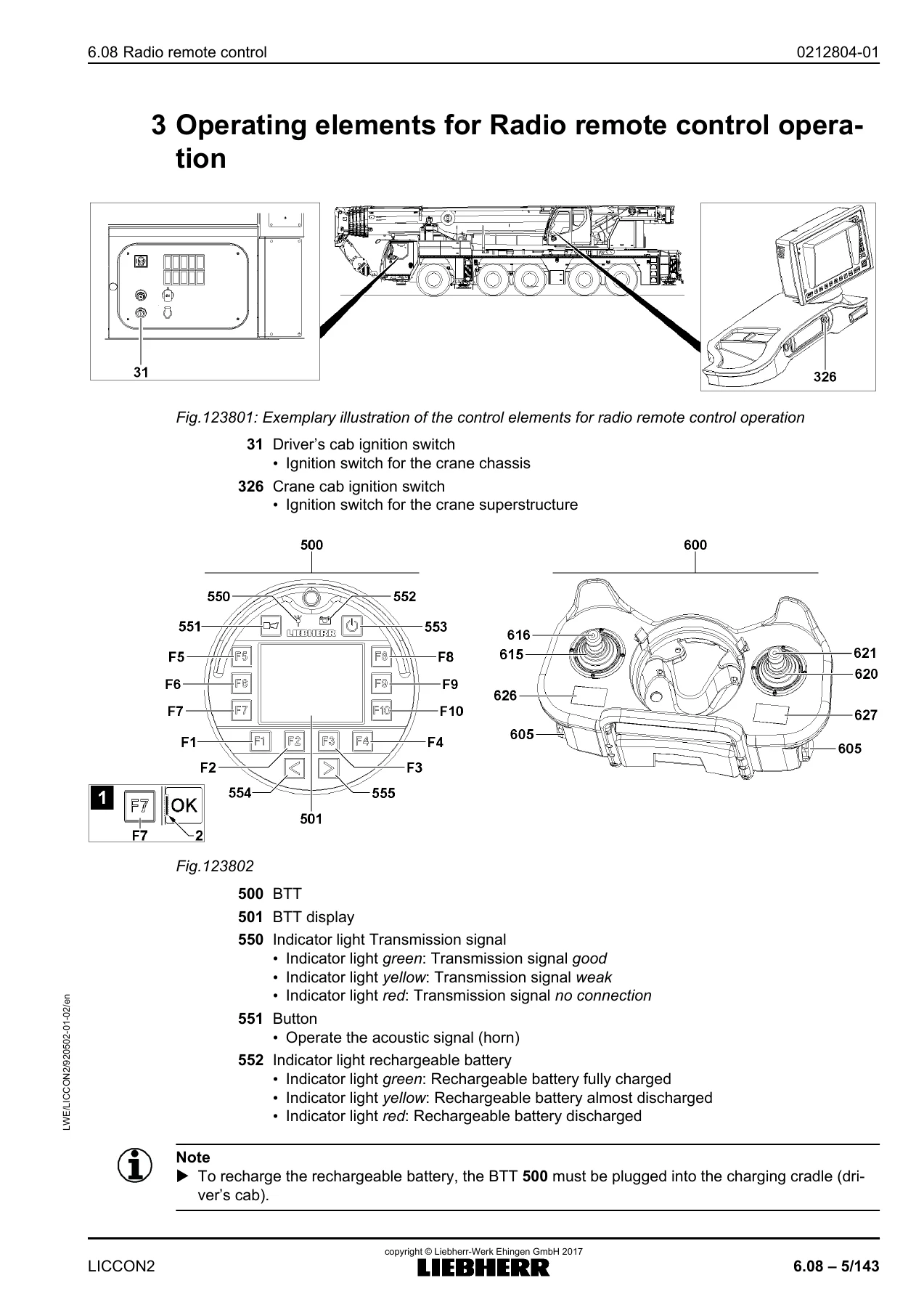
The Liebherr LTM 1130-5.1 LICCON2 Radio Remote Control Operating Instructions (BAL 920502-01-02) is the dedicated operating manual for the radio remote control system fitted to the LTM 1130-5.1 mobile crane running the LICCON2 control platform. It documents the Bluetooth Terminal 500 (BTT), the Bluetooth Basis (BTB) and the Radio remote control console 600 (also called BTT-E), and walks the operator through every screen, menu, function key and manual control lever assignment used in remote crane operation. From aligning the console with the crane chassis and selecting the correct support configuration, through sliding beams, axle suspension, telescoping and assembly functions, to shutting the crane down after a shift, this is the reference document the radio remote control system was designed to be used with.
File Details
- Manual type: Original operating manual (operating instructions)
- Document number: BAL 920502-01-02
- Brand / manufacturer: Liebherr-Werk Ehingen GmbH
- Machine: LTM 1130-5.1 mobile crane, LICCON2 control system
- Section: 6.08 Radio remote control (additional equipment)
- Language: English
- File format: PDF
- Page count: 163 pages
- Copyright reference in document: 2017, Liebherr-Werk Ehingen GmbH
Chapters Covered
- Technical safety instructions
- Description of the function
- Operating elements for radio remote control operation
- Menu guide – radio remote control
- Settings and status displays for radio remote control operation
- Aligning the radio remote control with the crane
- Engine operation menu
- Support the crane / automatic support menu
- Axle suspension menu
- The radio remote control operating screen
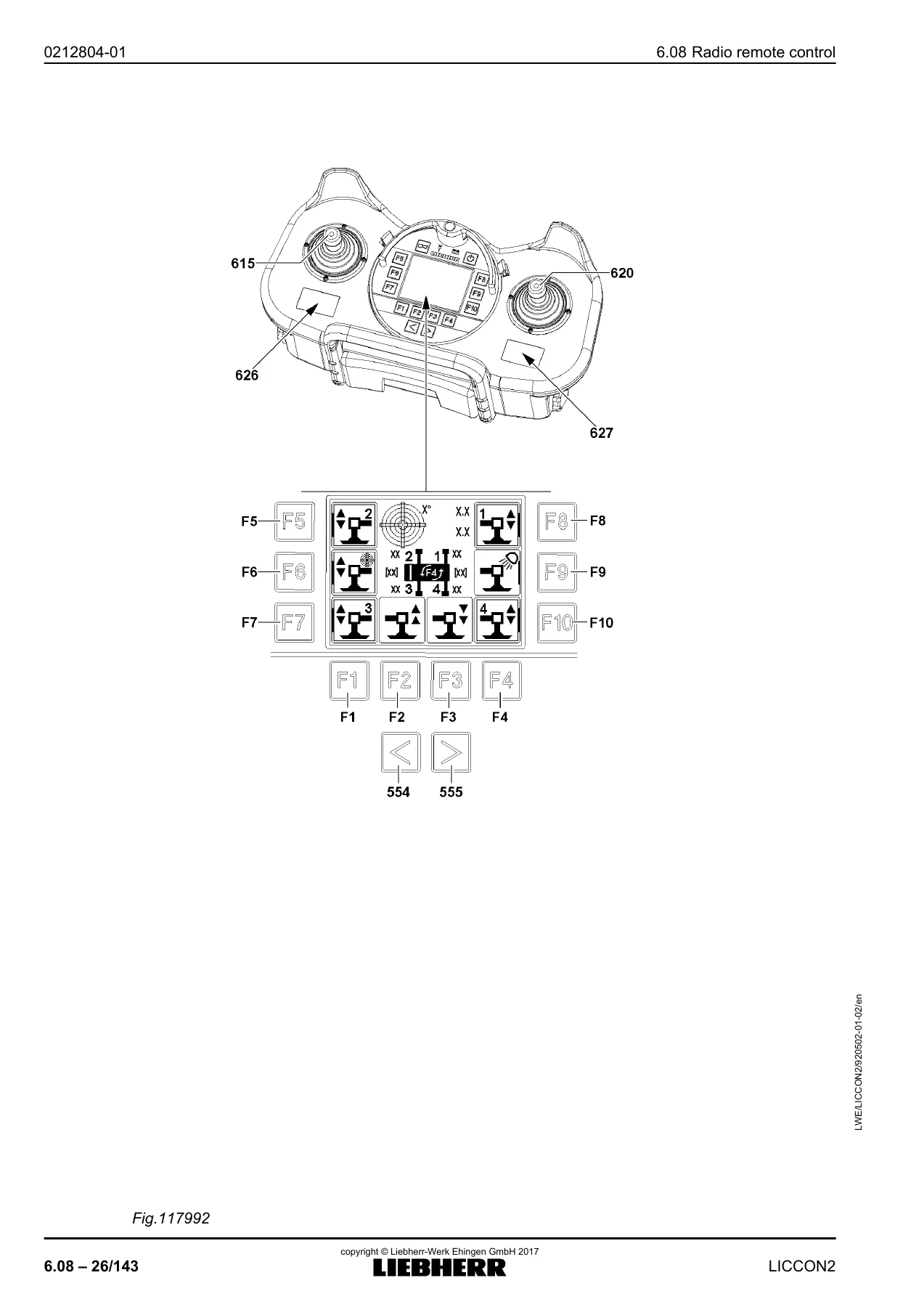
- Sliding the sliding beam / supporting the crane menu
- Crane superstructure assembly functions menu
- Test system menu
- Start up of the radio remote control
- Crane operation with radio remote control
- Measures in case of problems
- Inspection and maintenance
Across those seventeen chapters the manual builds a complete working picture of the LTM 1130-5.1 radio remote control system: how the BTT 500 display is laid out and how its function keys are used, how the transmission signal and battery indicator lights behave, how the operator’s standing position is entered into the crane icon, and how the individual function keys open the engine, support, axle suspension and assembly menus. The description section explains the signal path from the radio remote control panel 600 through the BTT 500 to the crane, and it also covers the cabled alternative connection when a radio link is not practical.
Operating Screens and Menus Explained
The menu guide chapter is followed by a detailed breakdown of every screen. The engine operation menu section covers the rpm readout, engine assignment icon, start readiness monitoring, pre-glow, crane chassis ignition state and the engine monitoring functions for fuel reserve, coolant temperature, engine oil pressure, air filter, charge control, urea tank and exhaust aftertreatment, coolant level, charge air temperature, hydraulic oil temperature, hydraulic oil, battery voltage, transmission, engine oil level, hydraulic oil level and the general warning icons. Each icon colour – green, orange, red – and the action it calls for is described.
The support menu chapter documents the crane icon, the incline icon with its graphic and numeric displays, the support force values for each of the four support cylinders, the direction and value arrows, and the difference between manual support selection and automatic support. The axle suspension chapter follows the same pattern: manual level control, setting to driving level, automatic levelling, and blocking or engaging the axle suspension with icons 540 and 541.
The radio remote control operating screen chapter is the heart of the manual for day-to-day work. It explains the short code display, maximum load according to load chart and receiving, actual load, boom radius, main boom angle, auxiliary boom or accessory angle, utilization bar and percentage, engine rpm and ECO mode, the operating mode confirmation display, hoist limit switch icon, load chart advance warning and STOP icons, and the wind speed icon. Winch display, support force display, speed reduction display and incline display are all documented, together with the slewing angle and direction of rotation of the superstructure.
Driving, Supporting and Telescoping from the Radio Remote Control
Operating instructions for the sliding beam and support menu show how to confirm the operator’s orientation on the crane icon, select sliding beams 1 through 4, retract and extend selected sliding beams, and retract or extend the corresponding support cylinders using function keys or by deflecting the manual control levers 615 and 620. The assembly functions chapter covers assembling the hydraulic folding jib, ballasting and turntable lock, lifting and lowering the folding jib, positioning the crane cab step, and fastening the hook block, including the two variations that depend on whether the BTT was switched on through the crane superstructure ignition or the crane chassis ignition.
Telescoping is treated in two dedicated sub-sections – one for the rope-mechanism telescoping system and one for the TELEMATIC telescoping system – with separate procedures for single-winch and twin-winch cranes, direction checks against the field 3.1 display, and how to abort telescoping if required.
Start-Up, Error Handling and Maintenance
The start-up chapter sets out the full activation sequence: BTT in the charging cradle, ignition switch to position I, operating mode and set-up configuration entered and confirmed on the LICCON monitor, BTT inserted into the radio remote control panel 600, and the OK icon on function key F7 changing from orange to green when the crane is ready for remote control. Starting the crane with the BTT and starting it with the ignition switch are both described, as is performing an emergency stop with switch 556 on the rear of the BTT.
The measures in case of problems chapter deals with error messages and the B and E information fields, a dark BTT display, low battery indication, faulty radio connections and how to bypass the radio link with the connecting cable. Inspection and maintenance closes the manual with functional checks on the radio remote control, dust cover inspection on the manual control levers, and cleaning guidance.
What This Manual Enables You to Do
With the Liebherr LTM 1130-5.1 LICCON2 radio remote control operating manual on hand you can work the crane from the radio remote control with the correct menu, the correct function key and the correct lever direction for every task: supporting the crane, sliding the beams out to the right setting, leveling the axle suspension, luffing, telescoping, fastening the hook block and reading every warning that appears on the BTT display. It lets you confirm the operator alignment correctly, so the crane icon on screen matches the actual position of the operator around the chassis, and it lets you interpret support force values, incline readings and utilization percentages rather than guessing at them.
That matters because the radio remote control gives no useful feedback if the wrong menu is open or the wrong beam is selected – the crane simply does not respond as expected, and the reaction to an overload or a support force imbalance depends on the settings shown on the LICCON monitor. Having the exact procedure and the exact icon meanings in front of you removes that uncertainty and keeps the LTM 1130-5.1 inside its permitted configurations.
IMAGES PREVIEW
Delivery is instant. After checkout the PDF is available for immediate download – no shipping, no waiting for a printed copy. The file opens on any laptop, tablet or phone and can be printed page-by-page for the crane cab if you prefer a paper copy. Keep it with the crane documentation so the latest version is always within reach.

Reviews
There are no reviews yet.