★ TRUSTED BY 321,897+ PROFESSIONALS WORLDWIDE
🏒
Trusted Business
Verified & Licensed
πŸ›‘οΈ
Virus Free Files
100% Safe Downloads
πŸ”’
Secure Payment
SSL Protected
⚑
Instant Delivery
Available Immediately
Sale!

Philips Essenta DR 1.0.x Instructions for Use Manual – Eleva Workspot & Optimus 50/65/80

Original price was: $44.95.Current price is: $27.95.

Complete Instructions for Use for the Philips Essenta DR digital X-ray system, covering the Eleva Workspot and Optimus 50/65/80 generator. This 477-page manual provides full operating, safety, maintenance, and technical data for the entire imaging chain.

SKU: PHL-ESSENTA-DR-IFU-451298720622 Category: Tags: , , , Vendor: Air Conditioning Manuals
⚑
Instant PDF Download
Available immediately
πŸ’Ύ
Save to Your Device
Download & keep forever
πŸ›‘οΈ
Antivirus Scanned
100% virus-free
🌍
Trusted Worldwide
175,000+ customers

Description

Philips Essenta DR 1.0.x Instructions for Use Manual

The Philips Essenta DR 1.0.x Instructions for Use Manual is the comprehensive operating guide for the Essenta DR digital multifunctional X-ray system. This 477-page document covers the complete imaging chain: the Essenta DR system itself, the Eleva Workspot operator console, and the Optimus 50/65/80 X-ray generator. It is the primary reference for radiographers, biomedical engineers, and service personnel who operate, maintain, or support this Philips digital radiography platform.

This Philips Essenta DR manual is not a brief quick-start guide. It is the full Instructions for Use document, published by Philips Medical Systems DMC GmbH under document number 4512 987 20622. Every section is written to support safe and effective operation, from initial system positioning through to detector calibration and error code resolution.

File Details

  • Manual Type: Instructions for Use
  • Brand: Philips
  • Models Covered: Essenta DR, Eleva Workspot, Optimus 50/65/80
  • Language: English
  • Page Count: 477
  • Document Number: 4512 987 20622
  • Publication Date: 2011-06
  • Format: PDF

Chapters Covered

This Essenta DR Instructions for Use manual is structured into ten primary chapters, plus dedicated sections for the Eleva Workspot and the Optimus generator. The contents include:

  • Worth Knowing: Publication details, compliance, intended use, prohibited use, compatibility, training requirements, and conformity information.
  • Safety and Requirements: Warnings and cautions, emergency procedures including the emergency stop switch and patient recovery crank, electrical safety, mechanical safety, explosion safety, fire safety, electrostatic discharge (ESD) precautions, electromagnetic compatibility (EMC), radiation protection, infrared transmitter warnings, and error message handling.
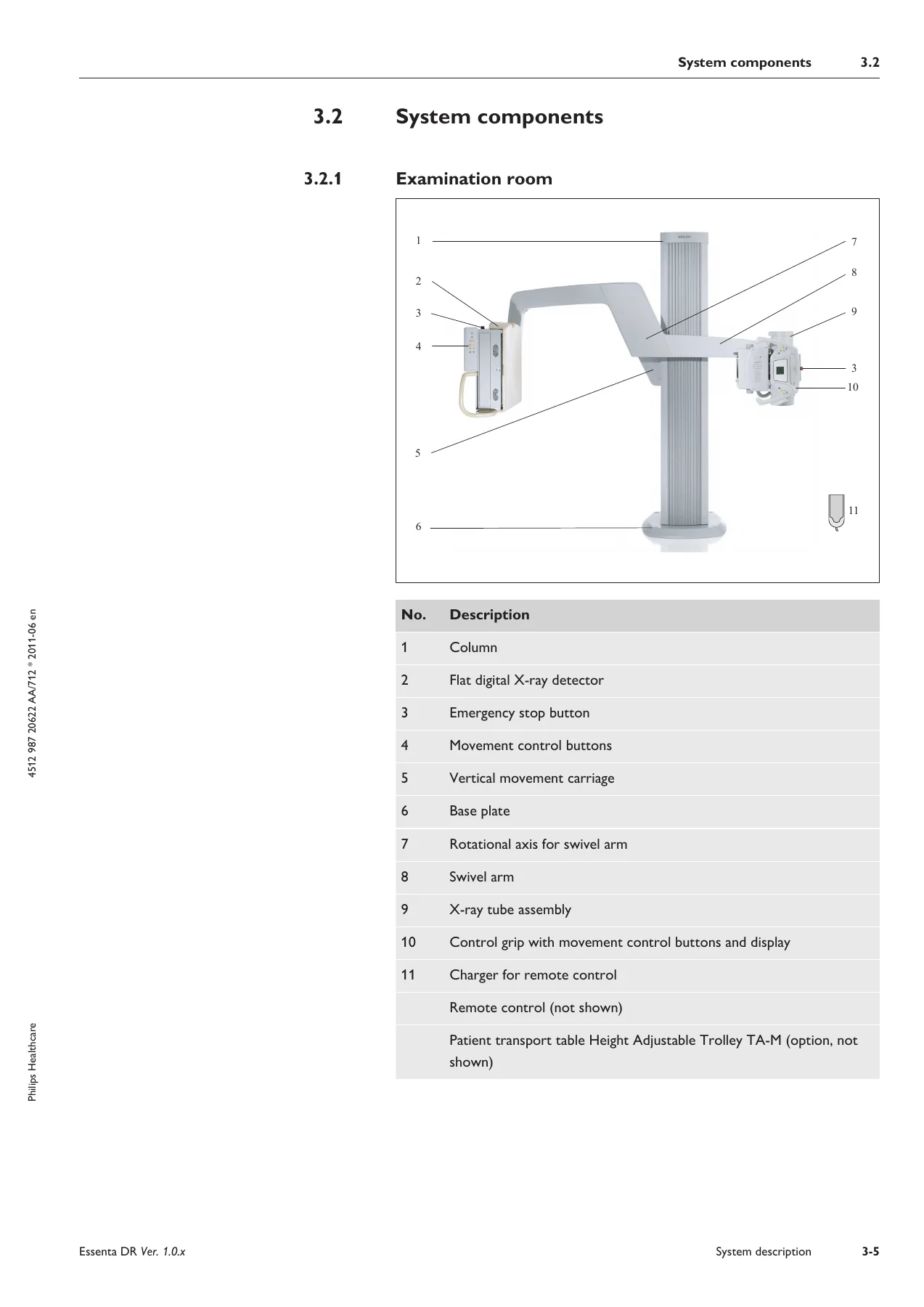
  • System Description: Full description of the Essenta DR system, examination room and control room components, the control grip, movement control buttons at the detector, remote control, generator control desk, and all system movements including collision protection and prevention.
  • Switching the System On/Off: Step-by-step power-up and shutdown sequences, plus emergency mode access.
  • The Pixium Flat X-Ray Detector: Detector description, operational use, grid insertion and removal, and grid parking.
  • Operation: Workflow overview, safety awareness, preparing the examination, collimation and light field indicator, exposure procedures, free exposure with cassettes, and detailed positioning examples for standing, seated, and recumbent patients.
  • Maintenance, Cleaning and Disposal: Planned maintenance, user routine checks, safety checks according to the Medical Device Directive, AEC function testing per IEC 60601-2-7, cleaning and disinfection procedures, product disposal, RoHS table, and REACH requirements.
  • Technical Data: General data, ambient conditions, unit data for the stand (column, vertical movement, swivel arm rotation, detector tilting, SID adjustment, power supply, weight), Eleva Workspot data, Optimus generator data, EMC data, changeable grids and usable SIDs, and label content.
  • Accessories: Patient transport tables (Height Adjustable Trolley TA-M and TRAUMOB X), infusion bottle holder, handrail, fixing aid, paper roll holder, table top support, and stretch grip.
  • Glossary: Definitions of technical terms used throughout the manual.

The manual also contains the complete Instructions for Use for the Eleva Workspot for Essenta DR, covering patient administration, performing examinations, review image processing, print functions, the optional QA tool, iSite PACS integration, and system administration and customization. The Optimus 50/65/80 generator section covers operation of all configurations, exposure techniques, APR records, tomography, fluoroscopy, dose display, maintenance, and technical data.

What This Manual Enables

With this Philips Essenta DR 1.0.x manual, a trained radiographer or service technician can correctly position the system for standing, seated, and recumbent patient examinations. It provides the exact procedures for collimation, selecting exposure parameters, using the AEC chambers, inserting or removing grids, and managing the Pixium flat detector. The safety chapter alone is essential reading, covering radiation protection measures, emergency stop procedures, and patient recovery using the manual crank handle if mains power is interrupted.

For biomedical engineers and service personnel, the technical data section delivers the electrical specifications, movement ranges, SID limits, grid compatibility tables, and EMC immunity data needed to verify system performance and troubleshoot issues. The error message chapter for both the multipurpose stand and the workstation provides the specific error numbers and corrective actions, reducing downtime and preventing unnecessary service calls.

Why This Manual Matters

The Essenta DR is a complex digital radiography system. Operating it without the correct procedures can lead to poor image quality, unnecessary radiation dose, or damage to the detector and positioning mechanics. The Essenta DR Instructions for Use manual is the document Philips expects users to read before operating the system. It contains the warnings, cautions, and notices that protect both the patient and the operator. Having this manual available in PDF form means the correct information is always at hand, whether you are at the workstation, in the examination room, or preparing for a service visit.

Complete PDF Bookmark Tree

Complete Bookmarks

The complete bookmarks in the β€œPhilips Essenta DR 1.0.x Instructions for Use Manual – Eleva Workspot & Optimus 50/65/80” are as follows:

Essenta DR V.1.0.x en-US.pdf
Table of Contentsp. 6
Worth Knowingp. 14
Publication Detailsp. 14
Compliancep. 14
About these Instructions for Usep. 14
Intended Usep. 15
Prohibited usep. 16
Compatibilityp. 16
Prescription Device Statementp. 16
Trainingp. 16
Conformityp. 17
Dangerous Substancesp. 17
Mercury (USA only)p. 17
Perchloratep. 17
RoHS (China only)p. 17
Other Instructions for Usep. 17
Safety and Requirementsp. 22
Warnings and Cautionsp. 22
Emergency Procedurep. 23
Emergency stop switchp. 23
Patient Recoveryp. 24
Electrical Safetyp. 25
Mechanical safetyp. 26
Explosion Safetyp. 28
Fire Safetyp. 28
Electrostatic Discharge (ESD)p. 29
Electromagnetic Compatibility (EMC)p. 29
Radiation Protectionp. 30
Infrared transmitterp. 31
Error messagesp. 31
On the multipurpose standp. 31
On the workstationp. 33
System descriptionp. 38
The Essenta DR systemp. 38
System componentsp. 40
Examination roomp. 40
Control roomp. 41
Control gripp. 43
Movement control buttons at detectorp. 45
Remote Controlp. 47
Generator control deskp. 49
System movementsp. 50
Safetyp. 50
Emergency stop switchp. 51
Collision protectionp. 51
Collision preventionp. 52
Select high/low speedp. 52
Moving the parts of the systemp. 53
Vertical movement up/downp. 53
SID adjustmentp. 54
Swivel arm rotationp. 54
Autopositioningp. 56
Detector/X-ray tube assembly adjustmentp. 57
Move out of collisionp. 60
Movements via remote controlp. 60
Switching the system on/offp. 64
Switching onp. 64
Switching offp. 65
In an Emergencyp. 66
The Pixium flat X-ray detectorp. 70
Descriptionp. 70
Using the detectorp. 71
How to Change the Gridp. 72
Insert Gridp. 72
Remove Gridp. 72
Park/Remove Gridp. 73
Operationp. 78
Workflowp. 78
Safety Awarenessp. 79
Preparing the examinationp. 79
Collimation/Light field indicatorp. 80
Movementsp. 80
Collimatingp. 80
Added filterp. 82
Exposurep. 82
Free exposurep. 83
Preparationp. 83
Determining SIDp. 83
Determining field sizep. 83
Examples for positioning the systemp. 84
Examination of a standing patientp. 84
Examination of a seated patientp. 84
Examination of a recumbent patient (detector under table)p. 85
Examination of a recumbent patient (detector beside/over table)p. 86
Examination with free cassettep. 87
Maintenance, cleaning and disposalp. 92
Maintenancep. 92
Planned Maintenancep. 92
Repairsp. 92
Recording Resultsp. 93
User Routine Checksp. 93
Obligations of the Userp. 93
Tests by the Userp. 93
Safety checks according to the Medical Device Directivep. 94
Checking AEC Function in accordance with IEC 60601-2-7p. 94
Cleaning and Disinfectionp. 94
Product Disposalp. 96
Passing the Product on to Another Userp. 96
RoHS Tablep. 97
REACH Requirementsp. 97
Technical Datap. 102
General Datap. 102
Ambient conditionsp. 102
Unit data (Stand)p. 102
Columnp. 102
Vertical movementp. 102
Swivel arm rotationp. 103
Detector Tiltingp. 103
SID adjustmentp. 103
Rotation of the X-ray tube assemblyp. 103
Power Supplyp. 103
Weightp. 103
Detectorp. 103
Eleva Workspotp. 104
Optimus generatorp. 104
EMC datap. 104
Guidance and manufacturer’s declarationp. 104
Electromagnetic interference immunity – recommended safety distancesp. 106
Changeable Grids and usable SIDsp. 107
Labelsp. 109
Content of Chinese labelp. 112
Accessoriesp. 116
The patient transport table Height Adjustable Trolley TA-Mp. 116
Legendp. 116
How to operate the TA-Mp. 117
Safety precautionsp. 117
Safety precaution for use with detectorp. 117
Applying/releasing brakesp. 117
Moving unitp. 118
Equipment datap. 119
Labelsp. 120
The patient transport table TRAUMOB Xp. 120
Design and functioningp. 120
Labelsp. 121
Accessories for patient transport table Height Adjustable Trolley TA-Mp. 122
Infusion bottle holderp. 122
Normal usep. 122
Prohibited usep. 122
Legendp. 123
Installingp. 123
Dismantlingp. 123
Technical datap. 124
Labelsp. 124
Handrailp. 124
Normal usep. 124
Prohibited usep. 124
Legendp. 125
Installingp. 125
Dismantlingp. 125
Technical datap. 126
Labelsp. 126
Fixing Aidp. 126
Normal usep. 126
Prohibited usep. 127
Legendp. 127
Installingp. 127
Dismantlingp. 128
Operationp. 128
Detach beltp. 128
Attach beltp. 128
Technical datap. 129
Labelsp. 129
Paper roll holderp. 129
Normal usep. 129
Prohibited usep. 129
Legendp. 130
Installingp. 130
Dismantlingp. 131
Technical datap. 131
Labelsp. 131
Table top supportp. 132
Normal usep. 132
Prohibited usep. 132
Legendp. 132
Operatingp. 132
Technical datap. 133
Labelsp. 133
Stretch gripp. 133
Normal usep. 133
Prohibited usep. 133
Legendp. 134
Attach stretch gripp. 134
Detach stretch gripp. 135
Operationp. 135
Technical datap. 136
Labelsp. 136
Glossary of termsp. 140
Indexp. 146
Eleva Workspot for Essenta DR V.1.0.x en-US.pdf
Contents
Worth Knowing
The Eleva Workspot
Publication Details
Compliance
About these Instructions for Use
Intended Use
Prohibited Use
Compatibility
Contra-indications (Beispiel aus Integris Allura)
Training
Conformity
Dangerous Substances
Mercury (USA only)
Perchlorate
RoHS (China only)
Safety and Requirements
Warnings and Cautions
Security Attributes and Recommendations
Electrical Safety
Mechanical Safety
Explosion Safety
Fire Safety
Electrostatic Discharge (ESD)
Special Safety Information
Loss of data due to power outage
Data Inconsistency
Using lead letters
Electromagnetic Compatibility (EMC)
Error Messages
System Description
System Components
Workflow
The Operator’s Console
Turning the System On/Off
Safety Awareness
Turning On
Turning Off
In an Emergency
The Pixium flat X-ray detector
Description
Using the detector
How to Change the Grid
Insert Grid
Remove Grid
Park/Remove Grid
The Operator’s Console
About this Chapter
Operator Console Features
How to Use the Operator’s Console
The Touch Screen
Selecting the Section
Scrolling Through Lists
Operating the Slide Controls
Operating Drop-Down Lists
Operating the Selection Fields
Operating Switches
Setting the On-Screen Keyboard
Patient Administration
The Patient List
Customizing the Patient List
Entering patient and examination data
Entering patient data
Adding a Study
Adding Examination Types
Protecting Patient Data and Images
Deleting a Study
Deleting Planned Examinations
Finding a Patient in the Patient List
Editing Patient and Examination Data
Deleting a patient's data from the Patient List
Getting patient data from RIS
Updating the Patient List
Getting Individual Examinations From RIS
Saving patient images to DICOM CD (optional)
Performing the Examination
The Examination section
Overview
Examination with Detector
Checking Image Quality on the Operator's Console
Exporting Images, Printing, and Completing the Examination
Making More Than One Exposure With the Same View
Workflow control
The Exposure Index
Pediatric Examinations
General
At the generator console
At the Eleva Workspot
Before exposure
Checks at the geometry
Checks at the Eleva Workspot
Checks at the generator console
After exposure
Quality Control
Review Image Processing
The Review Section
Exporting Images to an External DICOM Destination
Image Processing Tool Functions
Individual image processing tools
Calling up Image Processing Tools
Customizing Image Processing Tools
Setting Contrast and Brightness
Setting Image Processing Protocols
Setting Image Processing Parameters
Advanced Ranger Tool
Rotating and Flipping an Image
Annotating an image
Shutter Function
Scaling
Moving Images Between Examinations
Measurements
Resetting Image
Simple Ranger Tool
Print
The Print Section
Tools for Film and Printer Settings
Tools for Image Handling
Tools for Free Composing
The Template Editor
How to Modify Template for Current Patient (Normal User)
How to Modify, Delete, and Create Templates (Advanced User)
Template, Page, Viewport, and Text Box
The Page Editor
The Viewport Editor
The Text Box Editor
QA Tool (optional)
Introduction
Scope
Restricted Use
Overview QA Tool
Start the QA Tool
Exit the QA Tool
Legend
Set Time Range
Customize List of Analyzed Values
Processing of Stored Files
Generate Image Statistics
Legend
Set Image Filter
Rejected Images
Select Statistic Topic
Set Limit of Displayed Items
Select Chart Type
Customize Statistic Topic List
Export Image Statistics
Generate Statistics from Image Data Table
Legend
Customize Table Column Configuration
Show Image
Export Whole Data Sets from the Table
Detailed Column Statistics
Export Column Statistics
Generate Dose Statistics
Legend
Select Image Filter
Select Statistics Input
Customize Statistics Input
Customize Average Value Columns
Export Dose Statistics
Frequently Asked Questions
iSite
What is iSite?
Log in
System Administration and Customization
The System Section
Adjusting the Screen
Opening the Setting Screen
Brightness
Touch calibration
Display calibration
Maintenance, cleaning and disposal
Maintenance
Planned Maintenance
Repairs
Recording Results
User Routine Checks
Obligations of the User
Tests by the User
Detector Calibration
Preparation
Offset Calibration
Gain Calibration
Pixel Calibration
Image Display Characteristics Performance Check
Safety checks according to the Medical Device Directive
Cleaning
Cleaning and Disinfection
Cleaning the monitor
Touch monitor
Non-touch monitor
Product Disposal
Passing the Product on to Another User
REACH Requirements
Technical Data
General Data
Ambient Conditions and Power Supply
Operator's Console
Detector Unit
Computer
Changeable Grids and usable SIDs
Electromagnetic Compatibility (EMC) Data
Guidance and manufacturer’s declaration
Electromagnetic interference immunity – recommended safety distances
Labels
Computer
Appendix
Error messages
What You Should Know
Messages
Glossary
Index
Optimus_506580_3x_AC_en-US.pdf
Table of contents
Worth knowing
The Optimus generators
About these Instructions for Use
Normal use
Conformity
Compliance with legal requirements
Recycling
Dangerous Substances
Mercury (USA only)
Perchlorate
RoHS (China only)
Training
Other Instructions for Use
Safety and requirements
Safety
Electrical safety
Explosion safety
Fire Safety
Radiation Protection
Electromagnetic compatibility
Function and Description
The function
What the generator β€œcan do”
Possible configurations
The functions of the maximum configurations:
Additional Functions
What is new?
What you must know before switching on
Monitoring system for conditions to turn off an exposure
The operator’s console
Buttons and Displays – brief summary
Buttons and Displays – in detail
Operation
Operation of all configurations
Switching the generator on/off
Setting display brightness
Operation of the basic configuration
Exposure techniques
Making X-ray exposures
Operation with AEC, without APR
Exposure techniques
Making X-ray exposures
Operation with APR, without AEC
Exposure techniques
APR records
Lists and groups
Selecting a program from a group of programs (if saved)
Selecting a program from a list of APR programs
Overriding exposure data of an APR program
Saving overridden data
Operation with AEC and APR
Exposure techniques
Lists and groups
Selecting a program from a group of programs (if saved)
Selecting a program from a list of APR programs
Selecting exposure current for kV-mA technique
Tomography
Making tomographic exposures without automatic exposure control (TDC)
Tomographic exposures with automatic exposure control (TDC)
Making tomographic exposures with automatic exposure control (TDC)
Selecting initial current for TDC
Fluoroscopy
Perform fluoroscopy
Exposures with image intensifier or spot film device (SCOPOMAT)
Special exposures for therapy simulation
Dose display (option, depending on system)
Maintenance, cleaning and disposal
Service
Obligations of the user
Safety Checks According to the Medical Device Directive
Monitor function of dose rate control/AEC function according to IEC 60601-2-7
Dose rate control
AEC function
Repairs
Recording results
Tests by the user
Cleaning
Disinfection
Technical data
Electrical data
Overview
Exposure techniques
Setting Ranges
Environmental Requirements for Operation
Accuracy of the operating data, tolerances
Compliance
Tolerances of the Indicated X-Ray Tube Load Factors
Compatibility
Methods of Measurement
EMC data
Electromagnetic Interference Immunity – Recommended Safety Distances
Guidance and Manufacturer’s Declaration
Labels
Appendix
Error messages
The hierarchy of levels on the display
Screen/film Combinations
Button icons and their meanings
Exposure table
Glossary
Index
Eleva Workspot for Essenta DR V.1.0.x en-US.pdf
Contentsp. 150
Worth Knowingp. 160
The Eleva Workspotp. 160
Publication Detailsp. 160
Compliancep. 160
About these Instructions for Usep. 160
Intended Usep. 162
Prohibited Usep. 163
Compatibilityp. 163
Trainingp. 164
Conformityp. 164
Dangerous Substancesp. 164
Mercury (USA only)p. 165
Perchloratep. 165
RoHS (China only)p. 165
Safety and Requirementsp. 168
Warnings and Cautionsp. 168
Security Attributes and Recommendationsp. 169
Electrical Safetyp. 171
Mechanical Safetyp. 173
Explosion Safetyp. 173
Fire Safetyp. 174
Electrostatic Discharge (ESD)p. 174
Special Safety Informationp. 174
Loss of data due to power outagep. 174
Data Inconsistencyp. 174
Using lead lettersp. 175
Electromagnetic Compatibility (EMC)p. 175
Error Messagesp. 175
System Descriptionp. 180
System Componentsp. 180
Workflowp. 182
The Operator’s Consolep. 183
Turning the System On/Offp. 188
Safety Awarenessp. 188
Turning Onp. 188
Turning Offp. 189
In an Emergencyp. 189
The Pixium flat X-ray detectorp. 194
Descriptionp. 194
Using the detectorp. 195
How to Change the Gridp. 196
Insert Gridp. 196
Remove Gridp. 196
Park/Remove Gridp. 197
The Operator’s Consolep. 202
About this Chapterp. 202
Operator Console Featuresp. 202
How to Use the Operator’s Consolep. 204
The Touch Screenp. 204
Selecting the Sectionp. 204
Scrolling Through Listsp. 205
Operating the Slide Controlsp. 205
Operating Drop-Down Listsp. 205
Operating the Selection Fieldsp. 206
Operating Switchesp. 206
Setting the On-Screen Keyboardp. 207
Patient Administrationp. 212
The Patient Listp. 212
Customizing the Patient Listp. 214
Entering patient and examination datap. 215
Entering patient datap. 215
Adding a Studyp. 217
Adding Examination Typesp. 218
Protecting Patient Data and Imagesp. 219
Deleting a Studyp. 219
Deleting Planned Examinationsp. 219
Finding a Patient in the Patient Listp. 220
Editing Patient and Examination Datap. 220
Deleting a patient's data from the Patient Listp. 221
Getting patient data from RISp. 222
Updating the Patient Listp. 222
Getting Individual Examinations From RISp. 223
Saving patient images to DICOM CD (optional)p. 225
Performing the Examinationp. 228
The Examination sectionp. 228
Overviewp. 229
Examination with Detectorp. 230
Checking Image Quality on the Operator's Consolep. 232
Exporting Images, Printing, and Completing the Examinationp. 233
Making More Than One Exposure With the Same Viewp. 234
Workflow controlp. 237
The Exposure Indexp. 239
Pediatric Examinationsp. 241
Generalp. 241
At the generator consolep. 241
At the Eleva Workspotp. 242
Before exposurep. 243
Checks at the geometryp. 243
Checks at the Eleva Workspotp. 244
Checks at the generator consolep. 244
After exposurep. 244
Quality Controlp. 244
Review Image Processingp. 248
The Review Sectionp. 248
Exporting Images to an External DICOM Destinationp. 250
Image Processing Tool Functionsp. 250
Individual image processing toolsp. 251
Calling up Image Processing Toolsp. 251
Customizing Image Processing Toolsp. 252
Setting Contrast and Brightnessp. 254
Setting Image Processing Protocolsp. 255
Setting Image Processing Parametersp. 256
Advanced Ranger Toolp. 258
Rotating and Flipping an Imagep. 259
Annotating an imagep. 260
Shutter Functionp. 261
Scalingp. 264
Moving Images Between Examinationsp. 265
Measurementsp. 267
Resetting Imagep. 269
Simple Ranger Toolp. 269
Printp. 276
The Print Sectionp. 276
Tools for Film and Printer Settingsp. 278
Tools for Image Handlingp. 280
Tools for Free Composingp. 281
The Template Editorp. 284
How to Modify Template for Current Patient (Normal User)p. 284
How to Modify, Delete, and Create Templates (Advanced User)p. 284
Template, Page, Viewport, and Text Boxp. 285
The Page Editorp. 288
The Viewport Editorp. 291
The Text Box Editorp. 295
QA Tool (optional)p. 302
Introductionp. 302
Scopep. 302
Restricted Usep. 302
Overview QA Toolp. 302
Start the QA Toolp. 302
Exit the QA Toolp. 303
Legendp. 303
Set Time Rangep. 303
Customize List of Analyzed Valuesp. 304
Processing of Stored Filesp. 305
Generate Image Statisticsp. 306
Legendp. 306
Set Image Filterp. 307
Rejected Imagesp. 307
Select Statistic Topicp. 308
Set Limit of Displayed Itemsp. 309
Select Chart Typep. 309
Customize Statistic Topic Listp. 310
Export Image Statisticsp. 310
Generate Statistics from Image Data Tablep. 312
Legendp. 312
Customize Table Column Configurationp. 313
Show Imagep. 313
Export Whole Data Sets from the Tablep. 314
Detailed Column Statisticsp. 315
Export Column Statisticsp. 317
Generate Dose Statisticsp. 319
Legendp. 319
Select Image Filterp. 320
Select Statistics Inputp. 320
Customize Statistics Inputp. 320
Customize Average Value Columnsp. 320
Export Dose Statisticsp. 321
Frequently Asked Questionsp. 321
iSitep. 326
What is iSite?p. 326
Log inp. 326
System Administration and Customizationp. 330
The System Sectionp. 330
Adjusting the Screenp. 336
Opening the Setting Screenp. 336
Brightnessp. 337
Touch calibrationp. 337
Display calibrationp. 337
Maintenance, cleaning and disposalp. 340
Maintenancep. 340
Planned Maintenancep. 340
Repairsp. 340
Recording Resultsp. 341
User Routine Checksp. 341
Obligations of the Userp. 341
Tests by the Userp. 341
Detector Calibrationp. 342
Preparationp. 342
Offset Calibrationp. 344
Gain Calibrationp. 345
Pixel Calibrationp. 346
Image Display Characteristics Performance Checkp. 348
Safety checks according to the Medical Device Directivep. 350
Cleaningp. 351
Cleaning and Disinfectionp. 351
Cleaning the monitorp. 352
Touch monitorp. 352
Non-touch monitorp. 352
Product Disposalp. 353
Passing the Product on to Another Userp. 354
REACH Requirementsp. 354
Technical Datap. 358
General Datap. 358
Ambient Conditions and Power Supplyp. 358
Operator's Consolep. 359
Detector Unitp. 359
Computerp. 360
Changeable Grids and usable SIDsp. 360
Electromagnetic Compatibility (EMC) Datap. 360
Guidance and manufacturer’s declarationp. 360
Electromagnetic interference immunity – recommended safety distancesp. 362
Labelsp. 364
Computerp. 364
Appendixp. 368
Error messagesp. 368
What You Should Knowp. 368
Messagesp. 368
Glossaryp. 381
Indexp. 388
Optimus_506580_3x_AC_en-US.pdf
Table of contentsp. 392
Worth knowingp. 398
The Optimus generatorsp. 398
About these Instructions for Usep. 398
Normal usep. 399
Conformityp. 399
Compliance with legal requirementsp. 399
Recyclingp. 399
Dangerous Substancesp. 400
Mercury (USA only)p. 400
Perchloratep. 400
RoHS (China only)p. 400
Trainingp. 400
Other Instructions for Usep. 401
Safety and requirementsp. 404
Safetyp. 404
Electrical safetyp. 405
Explosion safetyp. 405
Fire Safetyp. 406
Radiation Protectionp. 407
Electromagnetic compatibilityp. 408
Function and Descriptionp. 412
The functionp. 412
What the generator β€œcan do”p. 412
Possible configurationsp. 412
The functions of the maximum configurations:p. 413
Additional Functionsp. 413
What is new?p. 413
What you must know before switching onp. 414
Monitoring system for conditions to turn off an exposurep. 415
The operator’s consolep. 416
Buttons and Displays – brief summaryp. 416
Buttons and Displays – in detailp. 418
Operationp. 426
Operation of all configurationsp. 426
Switching the generator on/offp. 426
Setting display brightnessp. 426
Operation of the basic configurationp. 427
Exposure techniquesp. 427
Making X-ray exposuresp. 427
Operation with AEC, without APRp. 428
Exposure techniquesp. 428
Making X-ray exposuresp. 429
Operation with APR, without AECp. 430
Exposure techniquesp. 430
APR recordsp. 431
Lists and groupsp. 431
Selecting a program from a group of programs (if saved)p. 431
Selecting a program from a list of APR programsp. 432
Overriding exposure data of an APR programp. 433
Saving overridden datap. 435
Operation with AEC and APRp. 435
Exposure techniquesp. 435
Lists and groupsp. 435
Selecting a program from a group of programs (if saved)p. 436
Selecting a program from a list of APR programsp. 437
Selecting exposure current for kV-mA techniquep. 439
Tomographyp. 440
Making tomographic exposures without automatic exposure control (TDC)p. 440
Tomographic exposures with automatic exposure control (TDC)p. 441
Making tomographic exposures with automatic exposure control (TDC)p. 441
Selecting initial current for TDCp. 442
Fluoroscopyp. 443
Perform fluoroscopyp. 443
Exposures with image intensifier or spot film device (SCOPOMAT)p. 444
Special exposures for therapy simulationp. 445
Dose display (option, depending on system)p. 446
Maintenance, cleaning and disposalp. 450
Servicep. 450
Obligations of the userp. 450
Safety Checks According to the Medical Device Directivep. 450
Monitor function of dose rate control/AEC function according to IEC 60601-2-7p. 451
Dose rate controlp. 451
AEC functionp. 451
Repairsp. 451
Recording resultsp. 452
Tests by the userp. 452
Cleaningp. 452
Disinfectionp. 453
Technical datap. 456
Electrical datap. 456
Overviewp. 456
Exposure techniquesp. 457
Setting Rangesp. 457
Environmental Requirements for Operationp. 458
Accuracy of the operating data, tolerancesp. 458
Compliancep. 458
Tolerances of the Indicated X-Ray Tube Load Factorsp. 459
Compatibilityp. 460
Methods of Measurementp. 460
EMC datap. 461
Electromagnetic Interference Immunity – Recommended Safety Distancesp. 461
Guidance and Manufacturer’s Declarationp. 461
Labelsp. 464
Appendixp. 468
Error messagesp. 468
The hierarchy of levels on the displayp. 468
Screen/film Combinationsp. 469
Button icons and their meaningsp. 470
Exposure tablep. 471
Glossaryp. 475
Indexp. 476


IMAGES PREVIEW

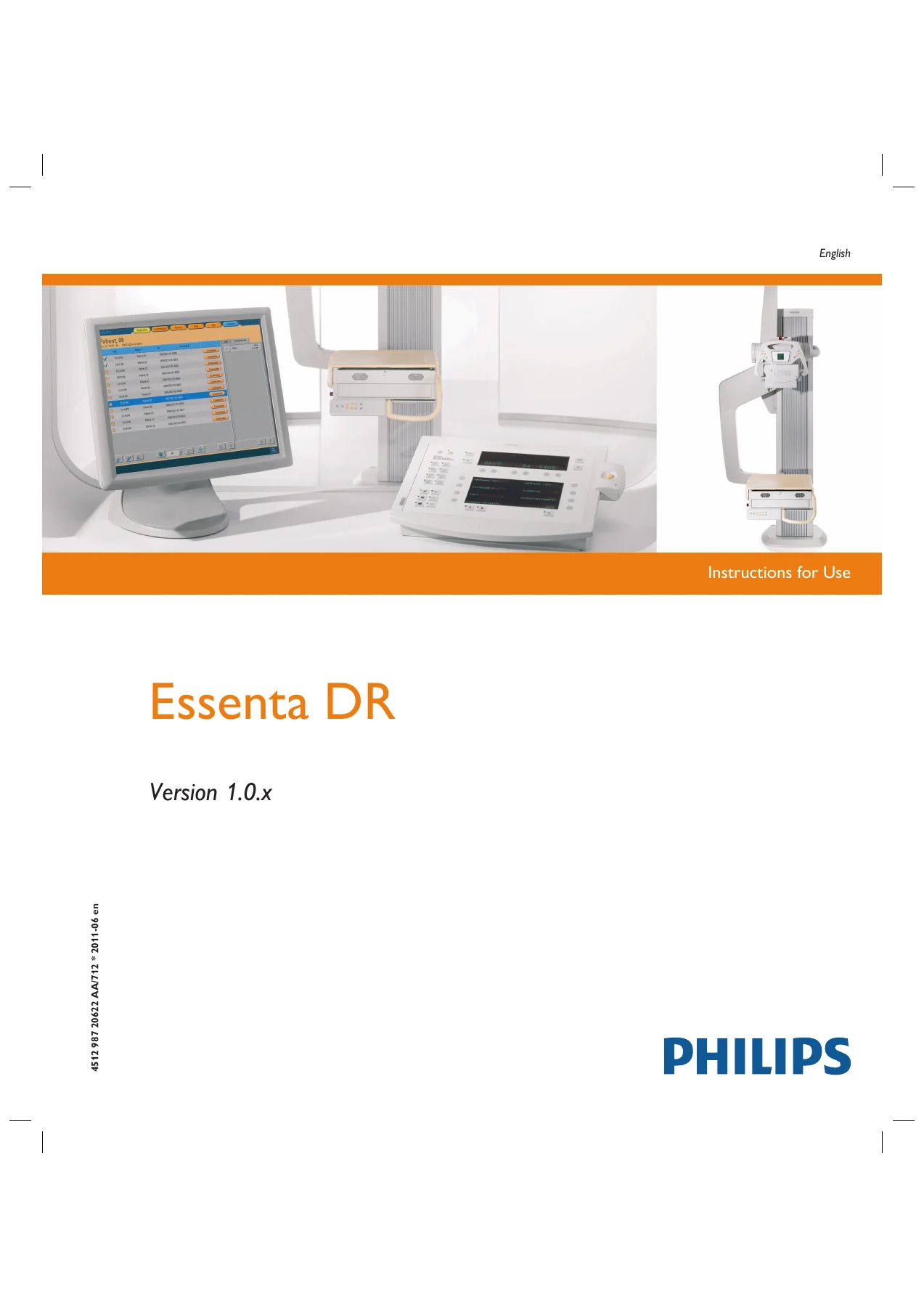
Philips Essenta DR 1.0.x Instructions for Use Manual - Eleva Workspot & Optimus 50/65/80 β€” PDF page 1 preview
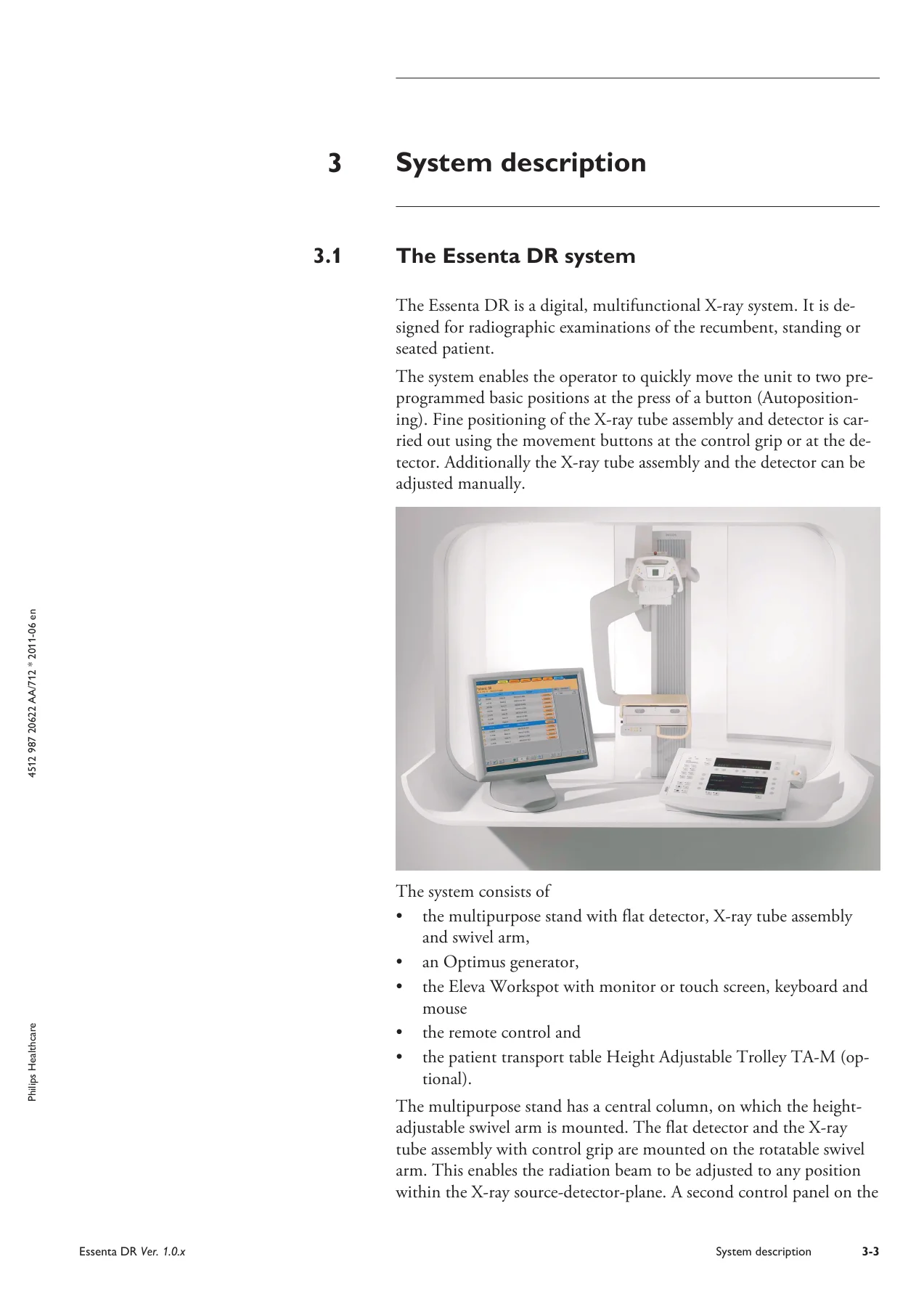
Philips Essenta DR 1.0.x Instructions for Use Manual - Eleva Workspot & Optimus 50/65/80 β€” PDF page 38 preview
Philips Essenta DR 1.0.x Instructions for Use Manual - Eleva Workspot & Optimus 50/65/80 β€” PDF page 40 preview

Instant PDF Delivery

This Philips Essenta DR manual is delivered as a PDF download. There is no shipping, no waiting, and no physical book to lose. Once purchased, you can access the file immediately on any device: desktop, laptop, tablet, or smartphone. The PDF can be printed for use in the examination room or kept on a service laptop for quick reference during maintenance. Every page is exactly as published, with all tables, figures, and technical data intact.
Reviews

There are no reviews yet.

Be the first to review “Philips Essenta DR 1.0.x Instructions for Use Manual – Eleva Workspot & Optimus 50/65/80”

What Our Customers Say

β˜…β˜…β˜…β˜…β˜… Live reviews from customers
Loading customer reviews...
0
    0
    Your Cart
    Your cart is emptyReturn to Shop
    πŸ›’
    Recently Purchased
    πŸ•’ verified order