
Ricoh D146 D147 D148 D149 D150 Service Manual – Installation & Options Guide PDF
Original price was: $42.95.$26.95Current price is: $26.95.
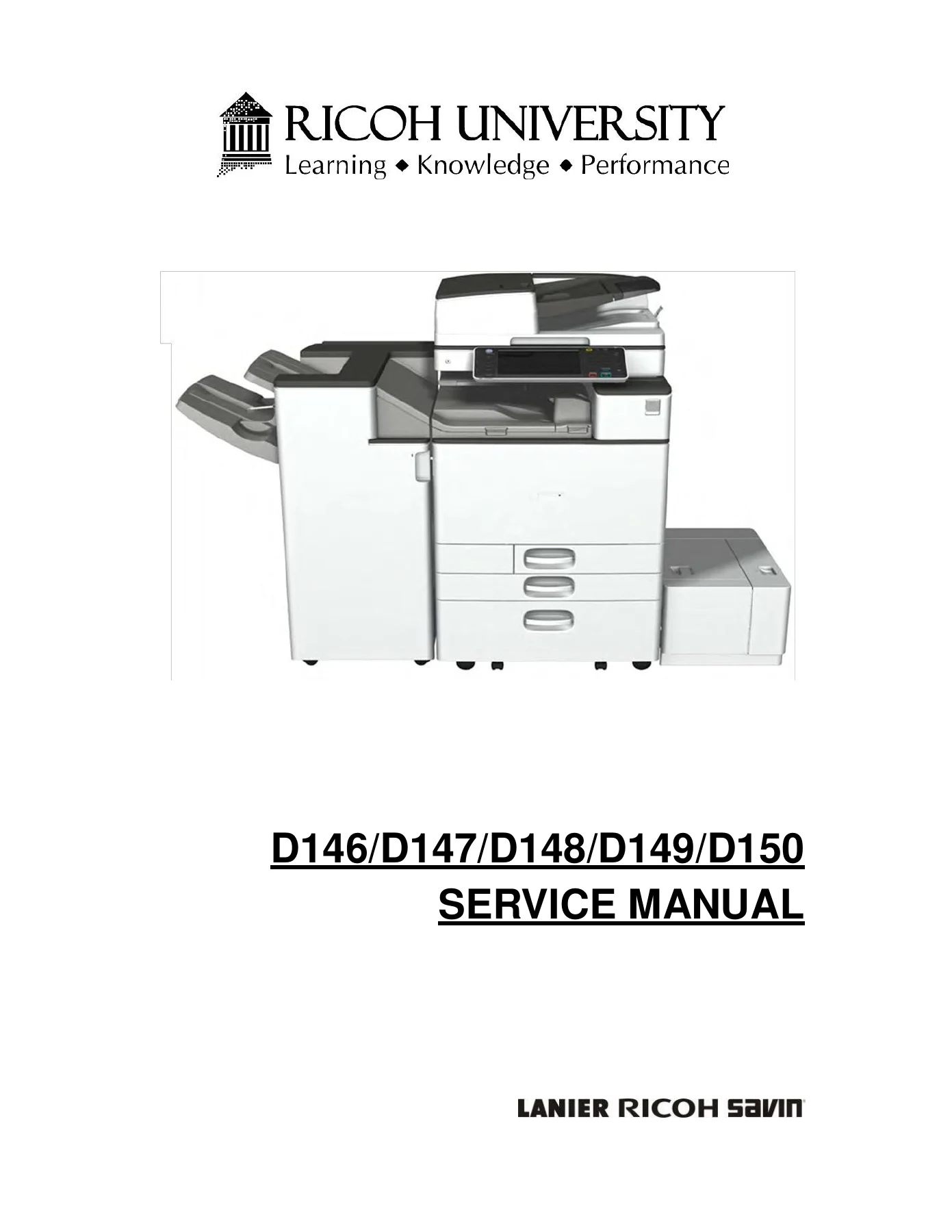
Complete installation and options service manual for the Ricoh D146, D147, D148, D149 and D150 series. Covers main machine setup, paper feed units, LCIT, finishers, punch units, SD card applications, interface boards, smart card reader and heater options. 226-page PDF.
Description
The Ricoh D146 D147 D148 D149 D150 Service Manual is the installation and options guide for the D146, D147, D148, D149 and D150 series multifunction office machines. This partial volume covers the complete installation workflow for the main machine and every supported optional unit, from paper feed and large-capacity trays to finishers, punch units, SD card applications and anti-condensation heaters. Every procedure is shown step by step with detailed photographs and callout letters, so a trained technician can follow along without guesswork. If you are commissioning a new machine or adding options to an existing one, this Ricoh D146 D150 installation manual gives you the sequence, the tools, the cautions and the SP settings you need.
File Details
- Manual type: Service Manual (Installation & Options)
- Brand: Ricoh
- Models covered: D146, D147, D148, D149, D150
- Language: English
- Page count: 226 pages
- File format: PDF
- Revision history: Includes updates through 05/26/2015 (see page 5)
Chapters Covered
- 2.1 Installation Requirements
- 2.2 Main Machine Installation
- 2.3 Paper Feed Unit PB3160
- 2.4 Paper Feed Unit PB3150
- 2.5 LCIT PB3170
- 2.6 LCIT RT3030
- 2.7 Caster Table Type M3
- 2.8 Platen Cover PN2000
- 2.9 ARDF DF3090
- 2.10 SPDF DF3080
- 2.11 Bridge Unit BU3070
- 2.12 1 Bin Tray BN3110
- 2.13 Internal Shift Tray SH3070
- 2.14 Side Tray Type M3
- 2.15 Booklet Finisher SR3170 / Finisher SR3160
- 2.16 Punch Unit PU3060
- 2.17 Booklet Finisher SR3150 / Finisher SR3140
- 2.18 Punch Unit PU3050
- 2.19 Internal Finisher SR3130
- 2.20 Punch Unit PU3040
- 2.21 Key Counter Bracket Type M3
- 2.22 Optional Counter Interface Unit Type A
- 2.23 Internal Options
- 2.24 IEEE 1284 Interface Board Type A
- 2.25 IEEE 802.11a/g/n Interface Unit Type M2
- 2.26 Bluetooth Interface Unit Type D
- 2.27 File Format Converter Type E
- 2.28 Data Overwrite Security Unit Type H/I
- 2.29 Copy Data Security Unit Type G
- 2.30 Imageable Area Extension Unit Type M3
- 2.31 OCR Unit Type M2
- 2.32 SD Card Option
- 2.33 SD Card Appli Move
- 2.34 Browser Unit Type M4/M3
- 2.35 SD Card for Netware Printing Type M4/M3
- 2.36 PS3 Card Type M4/M3
- 2.37 Camera Direct Print Card Type M4/M3
- 2.38 Color Controller Connection Board Type M4/M3
- 2.39 Smart Card Reader (D739)
- 2.40 Tray Heater for Main Machine
- 2.41 Tray Heater for PFU PB3160 / LCIT PB3170
- 2.42 Tray Heater for Paper Feed Unit PB3150 & Anti-Condensation Heater
Installation Requirements and Main Machine Setup
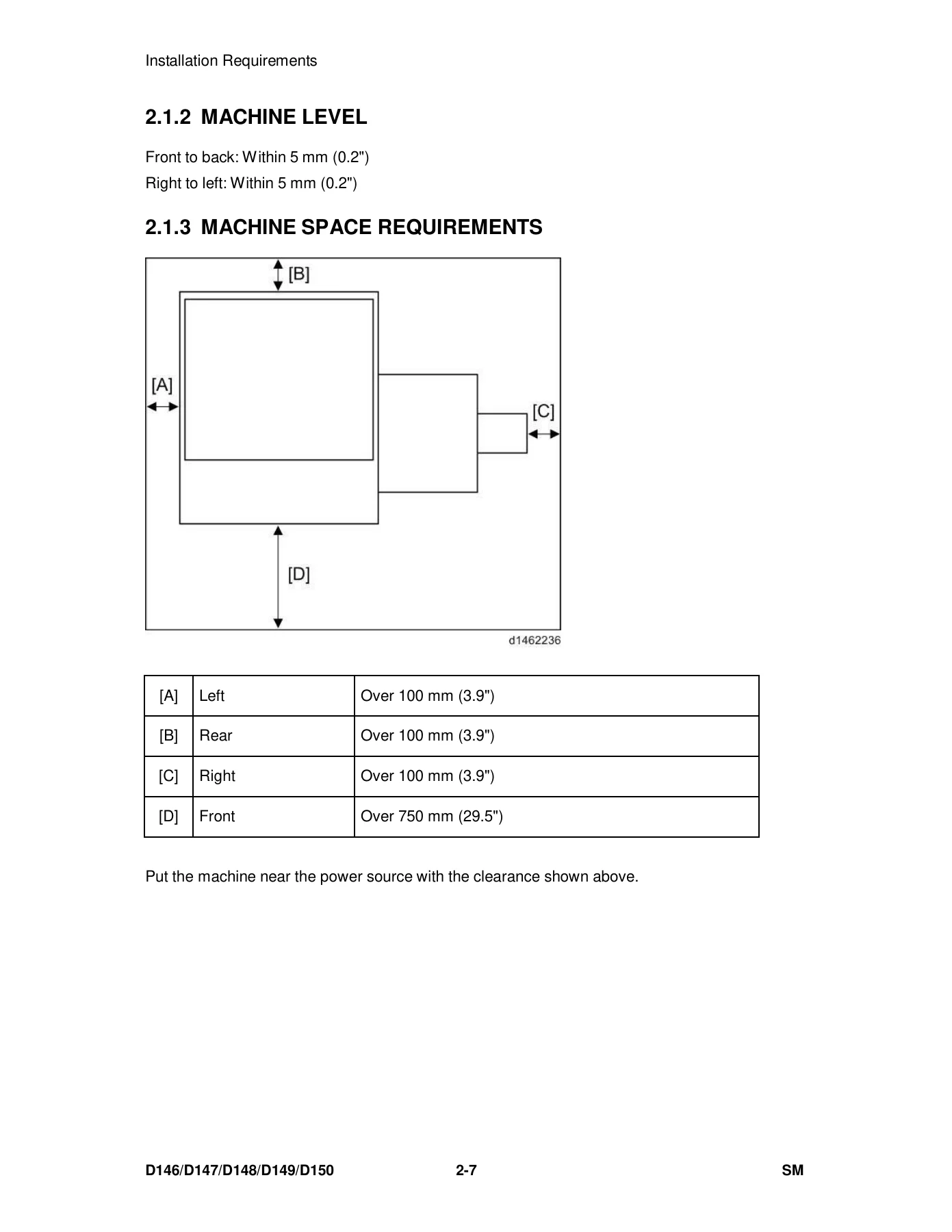
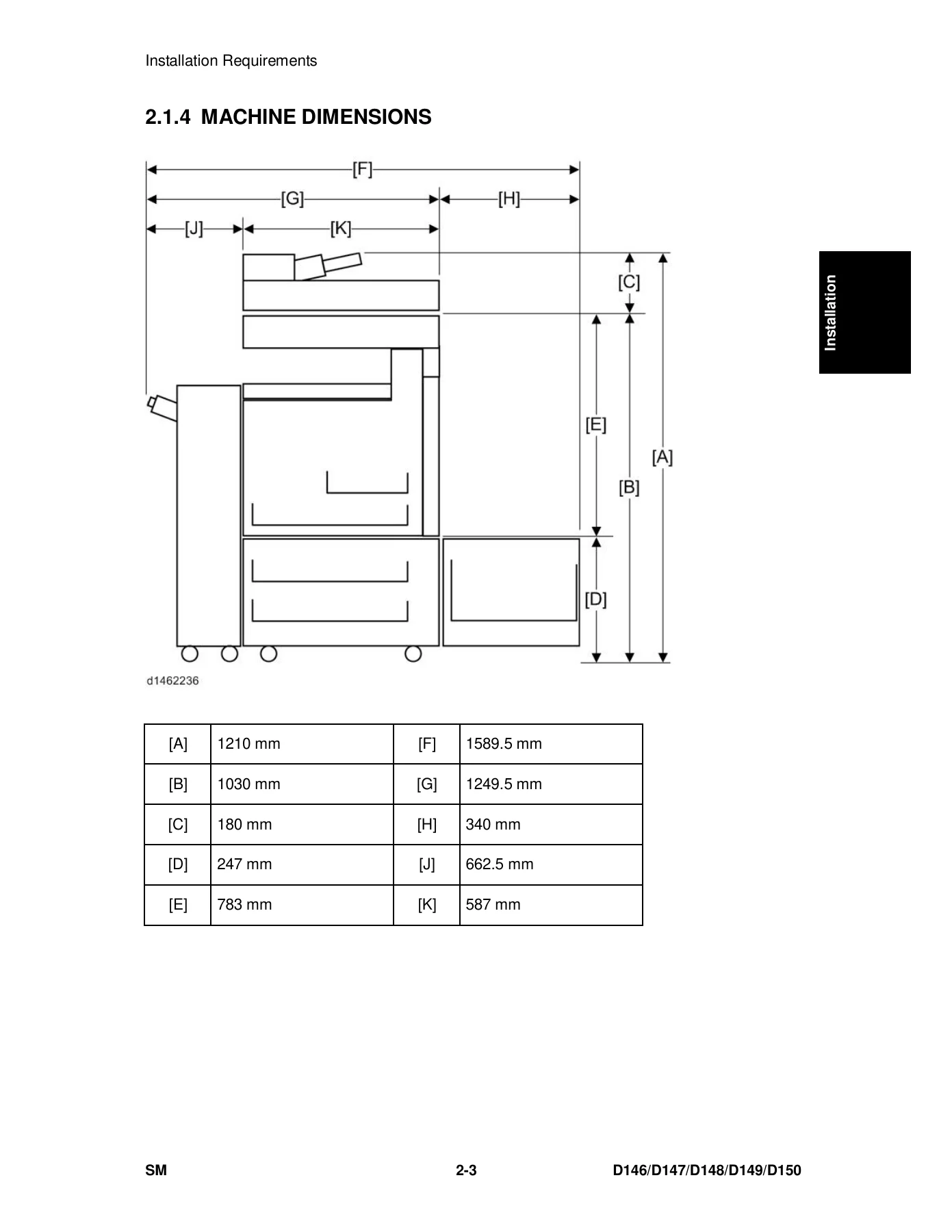
Section 2.1 gives you the environmental envelope for the D146–D150 series: temperature range, humidity range, ambient illumination, ventilation, altitude limits and floor-level tolerances. Machine level tolerances are specified front-to-back and right-to-left within 5 mm (0.2 in.). Section 2.1.3 lays out the minimum machine space requirements with a clearance diagram — left, rear and right each need over 100 mm (3.9 in.), and the front needs over 750 mm (29.5 in.). Section 2.1.4 provides the machine dimensions with a callout diagram and dimension table, and Section 2.1.5 covers power requirements and permissible voltage fluctuation for NA, EU, AP and CHN destinations.
Section 2.2 walks through the main machine installation from unpacking to image quality test. It includes the installation flow chart, accessory check table, removal of packing materials and shipping retainers, removal of the PCDU seal, PCDU reinstallation and harness connection, ITB contact/separation lever setting, SPDF protective sheet removal, toner bottle installation, paper output tray attachment, decal application, power cord connection, image quality test and paper setting. The security function installation procedure covers Data Overwrite Security and HDD Encryption unit activation, including the SP modes and User Tools settings required.
Paper Feed Units and Large-Capacity Trays
Sections 2.3 through 2.7 cover the Paper Feed Unit PB3160, Paper Feed Unit PB3150, LCIT PB3170, LCIT RT3030 and Caster Table Type M3. Each section provides an accessory check table, a numbered installation procedure with photographs, machine attachment and securing bracket details, decal placement, caster locking, power connection and the SP registration adjustments for the relevant trays (SP1-002-004 for Tray 3, SP1-002-005 for Tray 4, SP1-002-007 for the large capacity tray). Paper size changing procedures for the LCIT PB3170 and LCIT RT3030 are included, with the relevant SP settings (SP5-181-007, SP5-181-017).
Document Feeders, Platen Cover and Bridge Unit
Sections 2.8 through 2.11 cover the Platen Cover PN2000, ARDF DF3090, SPDF DF3080 and Bridge Unit BU3070. The ARDF and SPDF installation procedures include stud screw and knob screw mounting, harness connection, grounding wire attachment, platen sheet placement and registration adjustment. The SPDF section also covers Sub IPU attachment, BCU board replacement, EEPROM transfer, ferrite core installation, CIS image cable routing, I/F cable connection and the SP settings for CIS GB adjustment and ADF registration. The Bridge Unit section covers paper output tray removal, main power switch cover removal, bracket attachment and connection to the finisher.
Output Options: Trays, Shift Tray and Side Tray
Sections 2.12 through 2.14 cover the 1 Bin Tray BN3110, Internal Shift Tray SH3070 and Side Tray Type M3. These sections include accessory checks, removal of the standard paper output tray and covers, attachment of the tray unit, harness routing and connection, gear and support bar installation, and the Mylar placement instructions for the shift tray. Compatibility notes explain which options cannot be combined — for example, the side tray cannot be used together with the Internal Shift Tray SH3070 or Bridge Unit BU3070, and the bridge unit cannot be used with the Internal Shift Tray or Side Tray Type M3.
Finishers and Punch Units
Sections 2.15 through 2.20 cover the Booklet Finisher SR3170 (D688), Finisher SR3160 (D689), Punch Unit PU3060, Booklet Finisher SR3150, Finisher SR3140, Punch Unit PU3050, Internal Finisher SR3130 and Punch Unit PU3040. Each finisher section provides an accessory check, shipping retainer removal, shift tray and booklet tray attachment, relay guide plate and ground plate bracket installation, connecting bracket attachment to the machine, interface cable connection, stapler setting and power-on verification. The punch unit sections cover finisher rear cover removal, guide plate installation, hopper guide plate and registration sensor unit attachment, punch unit and stepping motor bracket installation, harness connection to the punch unit board and control board, and harness clamping. Compatibility and sequence notes are included — for example, the Bridge Unit BU3070 must be attached before the finisher, and the Paper Feed Unit PB3160 or LCIT PB3170 must be installed first.
Counter Options, Internal Interface Boards and SD Card Applications
Sections 2.21 through 2.38 cover the Key Counter Bracket Type M3, Optional Counter Interface Unit Type A, Internal Options list of slots, IEEE 1284 Interface Board Type A, IEEE 802.11a/g/n Interface Unit Type M2, Bluetooth Interface Unit Type D, File Format Converter Type E, Data Overwrite Security Unit Type H/I, Copy Data Security Unit Type G, Imageable Area Extension Unit Type M3, OCR Unit Type M2, SD Card Option, SD Card Appli Move, Browser Unit Type M4/M3, SD Card for Netware Printing Type M4/M3, PS3 Card Type M4/M3, Camera Direct Print Card Type M4/M3 and Color Controller Connection Board Type M4/M3. The SD card sections explain slot usage, SD card merge (Appli Move) procedures, Undo Exec recovery, and the SP modes required for installation and verification (SP5-873-001, SP5-873-002, SP5-878-004).
Smart Card Reader and Heater Options
Sections 2.39 through 2.42 cover the Smart Card Reader (D739), Tray Heater for the main machine, Tray Heater for PFU PB3160 / LCIT PB3170, Tray Heater for Paper Feed Unit PB3150 and the Anti-Condensation Heater for the scanner and PCDU. The Smart Card Reader section includes cover replacement, USB cable routing, reader cover attachment, clamp placement and controller USB port connection. The heater sections cover accessory checks, heater attachment, PCB DHB installation, harness routing, connector connection and the SP settings (SP5-805-01) that control heater behaviour. The Anti-Condensation Heater sections include part numbers for NA and EU configurations, scanner heater and PCDU heater installation, relay board connection and harness routing.
What This Ricoh D146 D150 Installation Manual Enables You to Do
With this manual you can commission a D146, D147, D148, D149 or D150 series machine from scratch, add any supported option in the correct sequence, and verify that everything is connected and configured properly. The installation flow chart at the start of Section 2.2 gives you the order of operations, so you know when to install the paper feed unit, when to attach the bridge unit, and when to connect the finisher. The SP mode tables tell you exactly which settings to change after each option is fitted, so registration, paper size detection, heater behaviour and security functions are configured correctly. The cautions throughout — about removing orange tape, avoiding pinched harnesses, not lifting by the scanner unit, and keeping the encryption key safe — are the details that prevent damage and callbacks.
Get the Ricoh D146 D147 D148 D149 D150 Service Manual as an Instant PDF
IMAGES PREVIEW
This Ricoh D146 D147 D148 D149 D150 service manual is delivered as an instant PDF download after payment. There is no shipping, no waiting for a physical book, and no risk of a lost or damaged copy. You can open it on any device — laptop, tablet or phone — and print the pages you need for the job. Whether you are a service technician commissioning a new machine, an office equipment dealer adding options, or a technical trainer building a reference library, this PDF gives you the complete installation and options procedures for the D146–D150 series in one convenient document. Download it now and have the procedures at hand before you open the first cover.



Reviews
There are no reviews yet.