Xerox DC 2125 Digital Copier MFP Service Manual Repair Guide PDF
Original price was: $85.00.$18.95Current price is: $18.95.
Official Xerox DC 2125 digital copier/MFP service manual for professional service technicians. This comprehensive 277-page PDF covers complete specifications, installation procedures, troubleshooting, maintenance modes, and repair procedures for this multifunctional office copier. Includes detailed disassembly instructions, electrical/mechanical diagnostics, paper misfeed detection, image formation problems, self-diagnostic codes, and optional equipment installation. Essential for Xerox service centers and office equipment technicians.
Description
Xerox DC 2125 Digital Copier MFP Service Manual Repair Guide PDF DOWNLOAD
DESCRIPTION
Xerox DC 2125 Digital Copier/MFP Service Manual – Complete Professional Office Equipment Service Reference
This is the official factory service manual for the Xerox DC 2125 digital copier and multifunctional peripheral (MFP). Published in 2004 by Xerox (Revision 0), this professional-grade technical documentation is essential for qualified service technicians, office equipment repair specialists, and authorized Xerox service centers who install, maintain, and troubleshoot this digital copying system.
📋 FILE DETAILS
- Manual Name: Service Manual – Copy DC 2125
- Device Covered: Xerox DC 2125 Digital Copier/MFP
- Manufacturer: Xerox Corporation
- Publication Date: 2004
- Revision: Rev. 0 (First Edition)
- Total Pages: 277 pages
- File Format: PDF
- PDF Quality: High-quality official manual with detailed diagrams
- Language: English
- Page Size: A4 format
🔧 COMPREHENSIVE COVERAGE INCLUDES:
Safety Precautions (Essential Reading)
Safety Warnings and Precautions:
- Various safety symbols (DANGER, WARNING, CAUTION)
- Triangle symbols for warnings
- General warnings
- Electric shock warnings
- High temperature warnings
- Prohibited actions
- Required actions
- Grounding requirements
1. Installation Precautions:
WARNINGS:
- Power supply voltage specifications
- Extension cable requirements
- Grounding requirements
- Electrical connection safety
- Gas pipe/lightning rod warnings
- Water pipe connection prohibition
CAUTIONS:
- Surface stability requirements
- Environmental conditions
- Heat source proximity
- Ventilation requirements
- Proper handling locations
- Anti-toppling devices
- Toner/developer exposure
- Customer safety guidance
2. Precautions for Maintenance:
WARNINGS:
- Power disconnect requirements
- Service manual procedures
- Safety feature integrity
- Correct parts specifications
- Thermostat/thermal fuse replacement
- Distance/gap measurements
- Ground connection verification
- Power cable inspection
- Optical unit disassembly prohibition
- High-voltage charger handling
CAUTIONS:
- Safe clothing requirements
- Powered machine operation
- Fixing section burn hazards
- Thermistor and roller cleanliness
- Ozone filter handling
- Power cord removal
- Cable routing protection
- Charger wire installation
- Toner removal from electronics
- Wire harness routing
- Post-maintenance verification
- Caution label inspection
- Grease and solvent handling
- Toner disposal safety
- Smoke response procedures
3. Miscellaneous Warnings:
- Drum heating prohibition
- Organic solvent restrictions
- Toxic gas prevention
Chapter 1-1: Specifications
1-1-1 Specifications:
- Copying speed
- Warm-up time
- First copy time
- Copy resolution
- Gradation levels
- Paper sizes supported
- Paper weight specifications
- Paper capacity
- Copy quantity limits
- Magnification ratios
- Zoom range
- Image processing features
- Power consumption
- Dimensions (W x D x H)
- Weight
- Operating environment
- Temperature range
- Humidity range
1-1-2 Parts Names:
(1) MFP (Multifunctional Peripheral):
- Main body components
- Paper feed sections
- Scanner assembly
- Control panel
- Covers and access doors
- Internal components
- Optional unit connections
(2) Operation Panel:
- Display screen
- Function keys
- Numeric keypad
- Copy start button
- Mode selection keys
- Control buttons
- Indicator lights
- Status displays
1-1-3 Machine Cross Section:
- Internal mechanism layout
- Paper path diagram
- Optical system
- Imaging components
- Fusing unit location
- Toner system
- Developer unit
- Transfer section
1-1-4 Drive System:
- Main drive motor
- Scanner motor
- Registration motor
- Exit motor
- Paper feed motors
- Clutch mechanisms
- Gear trains
- Belt drives
- Power transmission
Chapter 1-2: Handling Precautions
1-2-1 Drum:
- Photoconductor drum handling
- Light exposure precautions
- Surface protection
- Damage prevention
- Cleaning procedures
- Storage requirements
1-2-2 Toner:
- Toner handling safety
- Spill prevention
- Refill procedures
- Container replacement
- Disposal requirements
- Health precautions
1-2-3 Installation Environment:
- Temperature specifications
- Humidity requirements
- Ventilation needs
- Space clearances
- Surface requirements
- Power supply specifications
- Grounding requirements
Chapter 1-3: Installation (Complete Setup Procedures)
1-3-1 Unpacking and Installation:
(1) Installation Procedure:
- Carton removal
- Protective material removal
- Positioning the copier
- Leveling adjustments
- Power connection
- Initial setup
- Test copy procedures
- Quality verification
1-3-2 Setting Initial Copy Modes:
- Default settings configuration
- Paper size defaults
- Copy mode defaults
- Image quality settings
- Factory settings
1-3-3 Installing the Paper Feeder (Option):
- Paper feeder placement
- MFP alignment
- Connection procedures
- Paper tray installation
- Testing paper feed
- Capacity verification
1-3-4 Installing the DP – Document Processor (Option):
- DP positioning
- Pin alignment
- Cable connection
- Functionality testing
- Document feed verification
1-3-5 Installing the Duplex Unit (Option):
- Duplex module installation
- MFP connection
- Cable routing
- Two-sided copy testing
- Paper path verification
1-3-6 Installing the Drawer Heater (Option):
- Heater installation procedure
- Wiring connections
- Temperature control
- Humidity prevention
1-3-7 Installing the Key Counter (Option):
- Counter installation
- Key operation
- Usage tracking setup
- Accounting features
1-3-8 Installing the Finisher (Option):
- Finisher unit placement
- Connection procedures
- Stapling mechanism
- Sorting functions
- Capacity settings
1-3-9 Installing the Job Separator (Option):
- Job separator installation
- Tray positioning
- Job routing configuration
1-3-10 Installing the Fax System (Option):
- Fax module installation
- Telephone line connection
- Network configuration
- Fax function testing
- Send/receive verification
1-3-11 Installing the Scan System (Option):
- Scan module installation
- Network connectivity
- Scan-to-email setup
- Scan-to-folder configuration
- Resolution settings
1-3-12 Installing the Hard Disk (Option):
- Hard disk installation
- Data storage configuration
- Job storage capacity
- Document management features
Chapter 1-4: Maintenance Mode
1-4-1 Maintenance Mode:
(1) Executing a Maintenance Item:
- Accessing maintenance mode
- Password/key requirements
- Navigation procedures
- Executing functions
- Exiting maintenance mode
(2) Maintenance Mode Item List:
- Complete function listing
- Code references
- Access procedures
- Parameter ranges
(3) Contents of Maintenance Mode Items:
- Detailed descriptions of each item
- Adjustment procedures
- Calibration methods
- Test patterns
- Diagnostic functions
- Counter readings
- System information
- Component testing
- Image quality adjustments
- Density settings
- Registration adjustments
- Paper feed timing
- Sensor calibrations
- Motor adjustments
- High-voltage settings
- Temperature settings
- Network configuration
- Security settings
1-4-2 Management Mode:
(1) Using the Management Mode:
- Access procedures
- Administrator functions
- Configuration options
(2) Setting the Job Accounting:
- User tracking setup
- Department codes
- Billing functions
- Usage reports
(3) Copy Default:
- Default copy settings
- Paper selection
- Magnification defaults
- Density defaults
- Two-sided defaults
(4) Machine Default:
- System preferences
- Display settings
- Auto-clear time
- Energy saver settings
- Sound settings
(5) Bypass Setting:
- Manual feed tray configuration
- Paper size detection
- Paper type settings
(6) Checking Total Counter and Printing Counter Report:
- Total copy counter
- Department counters
- Print counter
- Scan counter
- Fax counter
- Counter report generation
(7) Status Report Print Out:
- Machine configuration
- Option information
- Network settings
- Version information
(8) Language Selection Function:
- Display language options
- Language change procedures
Chapter 1-5: Troubleshooting (Comprehensive Diagnostics)
1-5-1 Paper Misfeed Detection:
(1) Paper Misfeed Indication:
- Jam indicator display
- Location identification
- Error messages
- Recovery procedures
(2) Paper Misfeed Detection Conditions:
- Sensor locations
- Detection timing
- Jam types
- Sensor failures
(3) Paper Misfeeds:
- Feed roller jams
- Transport jams
- Registration jams
- Fusing unit jams
- Exit jams
- Duplex unit jams
- Finisher jams
- Clearing procedures for each location
1-5-2 Self-Diagnosis:
(1) Self-Diagnostic Function:
- Automatic error detection
- System monitoring
- Component verification
- Error logging
(2) Self-Diagnostic Codes:
- Complete error code listing
- Code descriptions
- Probable causes
- Corrective actions
- Component testing procedures
- Codes include:
- C1000 series (System errors)
- C2000 series (Motor errors)
- C3000 series (Sensor errors)
- C4000 series (Paper feed errors)
- C5000 series (Image formation errors)
- C6000 series (Fixing errors)
- C7000 series (Communication errors)
- C8000 series (Optional unit errors)
1-5-3 Image Formation Problems:
(1) No Image Appears (Entirely White):
- Exposure lamp failure
- Charging failure
- Developing failure
- Transfer failure
- Optical system issues
(2) No Image Appears (Entirely Black):
- Excessive charging
- Developing bias issues
- Transfer voltage problems
(3) Image is Too Light:
- Toner shortage
- Developing issues
- Exposure lamp degradation
- Density settings
(4) Background is Visible:
- Excessive charging
- Developer contamination
- Humidity issues
(5) A White Line Appears Longitudinally:
- Foreign matter on drum
- Drum damage
- Scanner issues
- Optical path obstruction
(6) A Black Line Appears Longitudinally:
- Drum damage
- Charging wire contamination
- Cleaning blade issues
(7) A Black Line Appears Laterally:
- Scanner problems
- Document processor issues
- Original placement
(8) One Side of the Copy Image is Darker:
- Uneven charging
- Developing roller issues
- Exposure imbalance
(9) Black Dots Appear on Image:
- Toner spillage
- Drum contamination
- Developer issues
(10) Image is Blurred:
- Focus issues
- Drum damage
- Fixing problems
- Paper moisture
(11) Leading Edge Image Misalignment (Consistent):
- Registration timing
- Scanner position
- Mechanical adjustment
(12) Leading Edge Image Misalignment (Sporadic):
- Paper feed timing
- Registration roller issues
- Clutch problems
(13) Paper Creases:
- Paper path misalignment
- Roller pressure
- Paper quality issues
(14) Offset Occurs:
- Fixing temperature
- Fixing pressure
- Toner issues
(15) Image is Partly Missing:
- Developing issues
- Transfer problems
- Paper feed issues
(16) Fixing is Poor:
- Low fixing temperature
- Insufficient pressure
- Contaminated rollers
- Thermistor failure
(17) Image is Out of Focus:
- Scanner positioning
- Optical alignment
- Document processor
(18) Image Center Does Not Align with Original Center:
- Scanner home position
- Mechanical adjustments
- Paper feed alignment
1-5-4 Electrical Problems:
Complete diagnostic procedures for:
- Power issues (C2000)
- Motor failures (drive, registration, exit, scanner)
- Cooling fan failures (1-4)
- Toner motor
- Drawer drive motor
- Clutch operations (paper feed, bypass, drawer)
- Lamp failures (cleaning, exposure)
- Fixing heater issues (C6000)
- Charging problems (main, transfer)
- Developing bias
- Original size detection
- Paper presence sensors
- Size detection accuracy
- Jam false triggers
- Cover switches
- Other electrical faults
1-5-5 Mechanical Problems:
(1) No Primary Paper Feed:
- Paper feed roller
- Clutch operation
- Sensor issues
(2) No Secondary Paper Feed:
- Registration roller
- Timing issues
(3) Skewed Paper Feed:
- Guide alignment
- Roller wear
- Paper curl
(4) Scanner Does Not Travel:
- Motor failure
- Belt issues
- Mechanical binding
(5) Multiple Sheets Fed:
- Separation issues
- Roller wear
- Paper quality
(6) Paper Jams:
- Path obstructions
- Roller contamination
- Timing issues
(7) Toner Drops on Paper Path:
- Seal damage
- Toner spills
- Developer issues
(8) Abnormal Noise:
- Gear problems
- Bearing wear
- Loose components
- Foreign objects
🎯 XEROX DC 2125 SPECIFICATIONS:
Copy Functions: ✅ Digital copying technology
✅ Multiple copy capability
✅ Zoom functionality
✅ Reduction/enlargement
✅ Auto paper selection
✅ Edge erase
✅ Image shift
✅ Density adjustment
Optional Features: ✅ Document processor (DP)
✅ Duplex unit (two-sided copying)
✅ Additional paper feeders
✅ Finisher with stapling
✅ Job separator
✅ Fax system
✅ Scan system
✅ Hard disk storage
✅ Key counter
✅ Drawer heater
Paper Handling: ✅ Multiple paper sizes
✅ Various paper weights
✅ Bypass tray
✅ Multiple drawer options
✅ High-capacity feeders
💡 IDEAL FOR:
✅ Xerox authorized service centers
✅ Office equipment service technicians
✅ Copier repair specialists
✅ Corporate IT maintenance departments
✅ Office equipment rental companies
✅ Document management service providers
✅ Print shop technicians
✅ Facilities management teams
✅ Educational institution maintenance staff
✅ Anyone servicing Xerox copiers/MFPs
🌟 KEY BENEFITS:
- Comprehensive 277 Pages: Extensive technical documentation
- Complete System Coverage: Base unit plus all optional equipment
- Safety First: Detailed safety precautions and warnings
- Installation Expertise: Complete setup for all options
- Maintenance Mode: Full access to diagnostic and adjustment functions
- Complete Fault Codes: Self-diagnostic code database with solutions
- Image Quality Troubleshooting: Systematic problem resolution
- Electrical/Mechanical Diagnostics: Component-level troubleshooting
- Official Xerox Documentation: Factory service procedures
- Minimize Downtime: Fast problem identification and resolution
📊 TECHNICAL HIGHLIGHTS:
Imaging Technology:
- Photoconductor drum
- Laser exposure system
- Dry electrostatic process
- Corona charging
- Developer system
- Transfer process
- Fusing unit with heat rollers
Digital Processing:
- Scanner system
- Image processing
- Digital zoom
- Auto exposure
- Image enhancement
- Document memory
Control Systems:
- Microprocessor control
- Sensor monitoring
- Motor control
- Temperature regulation
- Paper path control
- Safety interlocks
⚙️ SERVICE CAPABILITIES:
Diagnostic Systems:
- Self-diagnostic codes
- Error logging
- Component testing
- Sensor verification
- Motor testing
- Voltage measurements
Adjustments:
- Image density
- Registration timing
- Paper feed timing
- Scanner positioning
- High-voltage settings
- Temperature calibration
- Sensor calibration
Maintenance Functions:
- Cleaning procedures
- Component replacement
- Lubrication points
- Wear part identification
- Preventive maintenance schedules
📥 DOWNLOAD INFORMATION:
- Instant Download: Immediate access after purchase
- Format: PDF with bookmarks for easy navigation
- Compatibility: Works on PC, Mac, tablet, smartphone
- Searchable: Full-text search for quick reference
- Printable: Print entire manual or specific sections
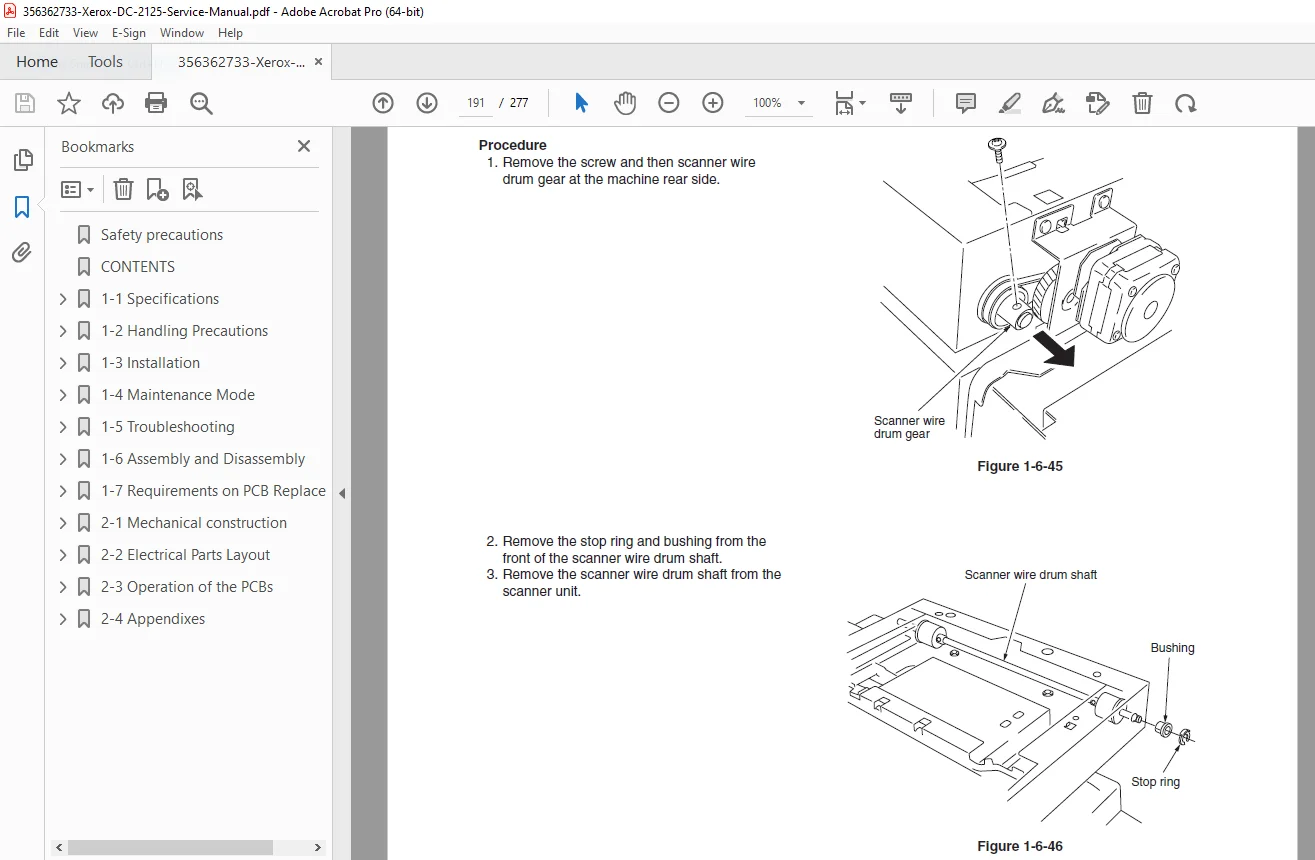
- High Quality: Clear diagrams, schematics, and photographs
- Bookmarked: Navigate easily to any chapter or section
- Professional: Official Xerox documentation
⚠️ IMPORTANT NOTES:
- This is a professional service manual for qualified technicians
- Contains high voltage warnings and safety procedures
- Official Xerox Corporation documentation
- Requires proper electrical safety training
- Essential for maintaining copier performance
- Some procedures require specialized tools
- Safety precautions must be strictly followed
- Proper ESD (electrostatic discharge) protection required
🔧 REQUIRED SERVICE EQUIPMENT:
- Digital Multimeter
- Oscilloscope (for advanced diagnostics)
- Torque drivers/wrenches
- Standard hand tools
- ESD protection equipment
- Cleaning supplies
- Test patterns
- Specialized Xerox tools
- Service key/password access
🌟 WHY CHOOSE THIS MANUAL?
This is the authentic Xerox factory service manual, not third-party documentation. It contains proprietary diagnostic procedures, maintenance mode access, adjustment methods, and repair procedures developed by Xerox engineers. The DC 2125 is a professional office copier/MFP requiring factory-level service procedures to ensure reliable operation and image quality.
The manual’s comprehensive coverage of both the base copier and all optional equipment makes it invaluable for service departments supporting complete document management systems.
Order now for immediate download access to complete Xerox DC 2125 digital copier service documentation!