
★ TRUSTED BY 321,897+ PROFESSIONALS WORLDWIDE
🏢
Trusted Business
Verified & Licensed
🛡️
Virus Free Files
100% Safe Downloads
🔒
Secure Payment
SSL Protected
Instant Delivery
Available Immediately
Sale!

GE Solar 8000M Patient Monitor Service Manual – Rev C (2005) PDF Download

Original price was: $34.95.Current price is: $19.95.

Official GE Medical Systems service manual for the Solar 8000M patient monitor. Covers maintenance, troubleshooting, repair, configuration, and theory of operation for the 8000M processing unit and Tram-rac acquisition systems. Includes electrical safety tests, checkout procedures, and detailed schematics.

Instant PDF Download
Available immediately
💾
Save to Your Device
Download & keep forever
🛡️
Antivirus Scanned
100% virus-free
🌍
Trusted Worldwide
175,000+ customers

Description

Complete Service & Repair Documentation for the GE Solar 8000M Patient Monitor

This comprehensive service manual provides everything needed to maintain, troubleshoot, and repair the GE Solar 8000M patient monitoring system. Intended for biomedical engineers and qualified service personnel, this manual delivers the technical depth required for field-level repairs, assembly-level diagnostics, and full system configuration within the Unity Network.

File Details

  • Manual Type: Official Service Manual (Assembly-Level Repair)
  • Document Number: 2000701-177 Revision C
  • Publication Date: 2005
  • Brand: GE Medical Systems Information Technologies
  • Language: English
  • Pages: 198
  • File Format: PDF
  • Supported Product Codes: 3T (Single Video), 3S (Dual Video), SBH (Single Video Only)

What’s Inside This Service Manual

The manual is organized to guide you from initial installation through advanced troubleshooting. It provides a clear understanding of the system’s architecture, from the Motorola PowerPC processor to the isolated M-Ports and Tram-net communication network.

IMAGES PREVIEW

GE Solar 8000M Patient Monitor Service Manual – Rev C (2005) PDF Download — PDF page 1 preview
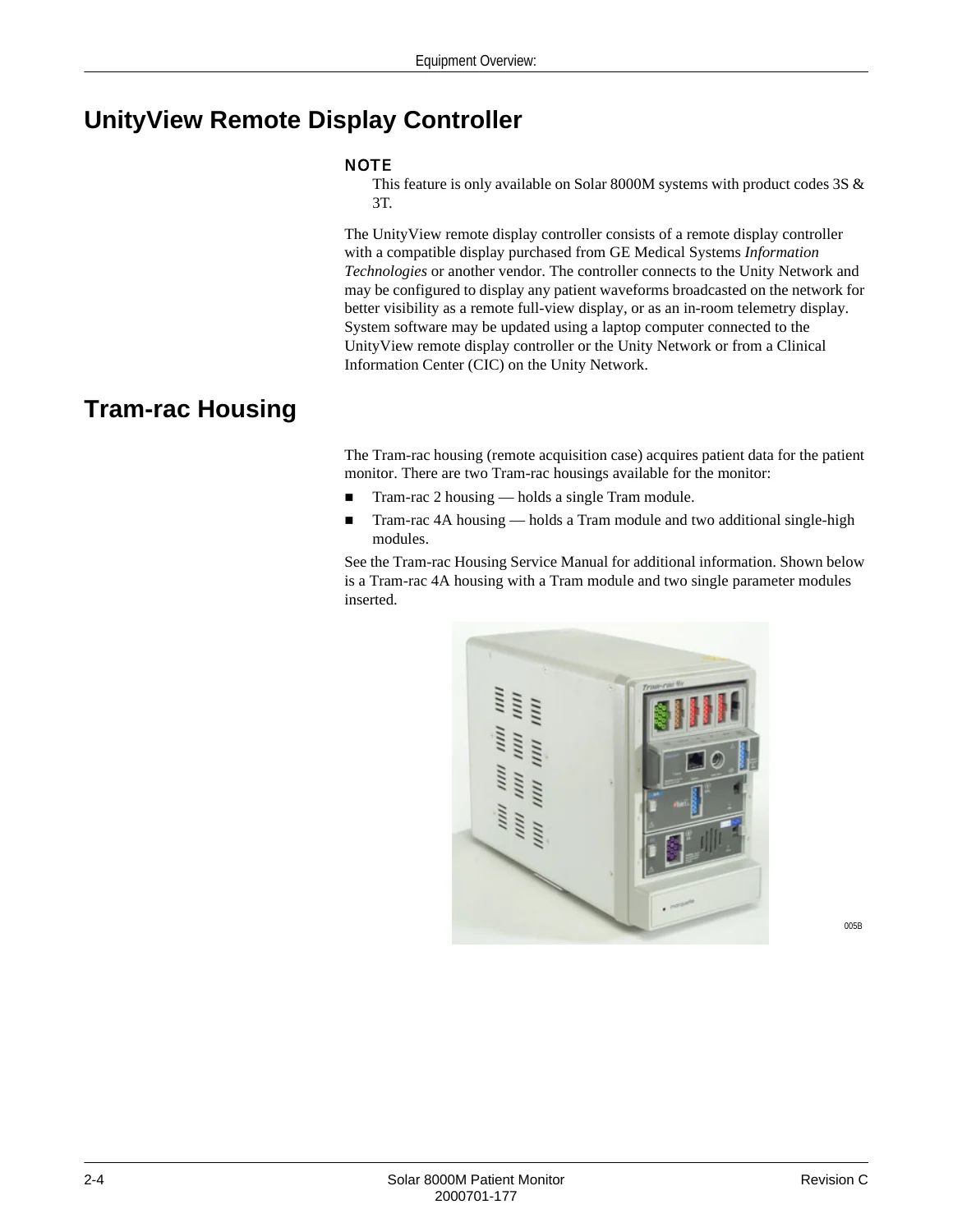
GE Solar 8000M Patient Monitor Service Manual – Rev C (2005) PDF Download — PDF page 9 preview
GE Solar 8000M Patient Monitor Service Manual – Rev C (2005) PDF Download — PDF page 20 preview

  • Chapter 1 – Introduction: Manual information, revision history, intended audience, and comprehensive safety information including warnings, cautions, and equipment symbols.
  • Chapter 2 – Equipment Overview: Detailed breakdown of system components including the Solar 8000M processing unit, UnityView remote display controller, Tram-rac housings, connectivity devices (Octanet, Unity Network ID), and peripheral devices like the PRN 50 digital writer.
  • Chapter 3 – Installation: Step-by-step back panel connection guides for all interfaces (VGA, DFP, RS-232, TRAM-NET, Ethernet, M-Ports), power-up procedures, and detailed explanations of Tram-net and Ethernet communication protocols, including network topology and IP address configuration.
  • Chapter 4 – Maintenance: Complete maintenance schedule including visual inspection, exterior cleaning procedures, and exhaustive electrical safety tests (Power Outlet Test, Ground Integrity, Enclosure Leakage Current, Patient Leakage Current). Includes a detailed checkout procedure for the monitor, Tram-rac housing, and all communication interfaces.
  • Chapter 5 – Troubleshooting: In-depth diagnostic section covering boot code, main code, and service menus. Includes a general fault isolation strategy, AC line voltage tests, and a comprehensive LED troubleshooting table for all processor board LEDs. Provides specific problem/solution matrices for common issues like display failures, communication loss, and boot errors.
  • Chapter 6 – Configuration: Advanced user procedures for setting unit name, bed number, patient-monitor type, and graph locations. Includes detailed guides for transferring monitor defaults, changing Ethernet and internet addresses, reviewing error logs, and managing software levels.
  • Chapter 7 – Replaceable Parts & Theory of Operation: Exploded views, parts lists, and field-replaceable unit (FRU) numbers. In-depth theory of operation covering the processor board (PowerPC MPC860P, memory subsystem, video system, communication systems), power supply (AC mains converter, DC-DC converters), and block diagrams. Complete pin-out tables for all rear-panel input/output connectors (VGA, DFP, RS-232, TRAM-NET, Ethernet, M-Ports).
  • Appendices: Technical specifications for the Solar 8000M patient monitor, Tram-rac housings, and all compatible Tram modules (ECG/Resp, Temperature, Invasive BP, NIBP, SpO2, Capnostat CO2, SvO2, Masimo SET, ICG, BIS/EEG). Includes a dedicated section on Electromagnetic Compatibility (EMC) with manufacturer guidance and declarations.

Complete PDF Bookmark Tree

Complete Bookmarks

The complete bookmarks in the “GE Solar 8000M Patient Monitor Service Manual – Rev C (2005) PDF Download” are as follows:

Contentsp. 3
1 Introductionp. 9
Manual Informationp. 11
Revision Historyp. 11
Manual Purposep. 11
Intended Audiencep. 11
Safety Informationp. 12
Responsibility of the Manufacturerp. 12
Generalp. 12
Warnings, Cautions, and Notesp. 12
Equipment Symbolsp. 14
Service Informationp. 15
Service Requirementsp. 15
Equipment Identificationp. 15
2 Equipment Overviewp. 17
System Componentsp. 19
Solar 8000M Patient Monitoring Systemp. 19
Solar 8000M Patient Monitorp. 19
UnityView Remote Display Controllerp. 20
Tram-rac Housingp. 20
Connectivity Devicesp. 21
PRN 50/PRN 50-M Digital Writerp. 21
Laser Printerp. 22
Remote Control/Keypadp. 22
Remote Displaysp. 22
Tram-net Interface Adapterp. 23
Device Compatibilityp. 24
Acquisition Devicesp. 24
Peripheral Devicesp. 26
Unity Network Devicesp. 26
Interfacesp. 28
3 Installationp. 31
Connectionsp. 33
Back Panel Connectionsp. 33
Front Panel Connectors and Indicatorsp. 37
Power Upp. 40
Tram-net Communicationp. 41
Overviewp. 41
Internal Hubp. 41
Ethernet Communicationp. 42
About Ethernetp. 42
Twisted Pairp. 42
Network Termsp. 43
4 Maintenancep. 45
Maintenance Schedulep. 47
Manufacturer Recommendationsp. 47
Manufacturer Responsibilityp. 47
Preventive Maintenancep. 47
Visual Inspectionp. 48
Cleaningp. 49
Cleaning Precautionsp. 49
Exterior Cleaningp. 49
Electrical Safety Testsp. 51
Generalp. 51
Recommendationsp. 51
Power Outlet Testp. 52
Ground (Earth) Integrityp. 52
Ground (Earth) Wire Leakage Current Testsp. 54
Enclosure Leakage Current Testp. 55
Patient (Source) Leakage Current Testp. 57
Patient (Sink) Leakage Current Test (Mains Voltage on the Applied Part)p. 58
Test Completionp. 59
Checkout Procedurep. 60
Generalp. 60
Required Tools/Special Equipmentp. 60
Procedurep. 60
Completionp. 64
Maintenance Checklistp. 65
“Visual Inspection” on page 4-4p. 65
“Cleaning” on page 4-5p. 65
“Electrical Safety Tests” on page 4-7p. 65
“Checkout Procedure” on page 4-16p. 65
Repair Logp. 66
5 Troubleshootingp. 69
Terms Usedp. 71
Abort (Main Code)p. 71
Boot Loader or Boot Codep. 71
Cold Startp. 71
Continue (Main Code)p. 71
Monitor Memoryp. 71
Protected Memoryp. 72
Power Cycle or Rebootp. 72
Service Mode (Main Code)p. 72
Service Menu (Boot Code)p. 72
Warm Start (Boot Code)p. 72
Country Selectionp. 72
Set Languagep. 72
Service Menus (Boot Code)p. 73
Boot Code Service Menup. 73
Main Code SERVICE MODE Menup. 75
General Fault Isolationp. 79
Visual Inspectionp. 79
Calibrationp. 80
AC Line Voltage Testp. 81
120 VAC, 50/60 Hzp. 81
240 VAC, 50/60 Hzp. 81
Troubleshooting Procedurep. 82
Before Replacing the Processor pcbp. 82
After Replacing the Processor pcbp. 83
Problems and Solutionsp. 84
LED Troubleshootingp. 88
Troubleshooting Software Updates – Problems and Solutionsp. 91
Error Messagesp. 92
6 Configurationp. 95
Configuring a Monitorp. 97
Generalp. 97
Set Unit Namep. 97
Set Bed Numberp. 98
Patient-Monitor Typep. 99
Set Graph Locationsp. 100
Admit Menup. 100
Set Line Frequencyp. 102
Set Defib Sync Voltage and Pulse Widthp. 102
Set Country Selectionp. 103
Set Languagep. 103
Calibrate Touchscreenp. 103
Completionp. 103
Proceduresp. 104
Set Time and Datep. 104
Change Software Levelp. 105
Enable Optionsp. 105
Transfer Monitor Defaultsp. 106
Change Ethernet Addressp. 109
Set Internet Addressp. 110
Power Cyclep. 111
Reviewing Error/Event Logsp. 112
Transferring Error Logsp. 117
7 Replaceable Partsp. 121
Theory of Operationp. 123
Processor Boardp. 124
Power Supplyp. 135
Speakerp. 139
Block Diagram of Internal Connectionsp. 140
Input/Output Connectors and Signalsp. 141
VGA VID 1p. 141
VGA VID 2p. 142
DFP VID 1p. 143
DFP VID 2p. 143
RS-232 1p. 144
RS-232 2p. 145
TRAM-NET 1p. 145
TRAM-NET 2p. 145
ETHERNETp. 146
M-Port 1p. 146
M-Port 2p. 146
M-Port 3p. 147
M-Port 4p. 147
Keypadp. 147
Disassembly Guidelinesp. 148
Generalp. 148
Opening the Unit for Servicep. 148
Ordering Partsp. 151
Field Replaceable Unitsp. 151
Solar 8000M Upper Level Assemblyp. 152
Keypads/Remote Controlsp. 154
Cablesp. 155
A Appendix A – Technical Specificationsp. 157
Solar 8000M Patient Monitorp. 159
Tram-rac 2 and 4A Module Housingsp. 161
Tram Modules and Solar Parameter Functionalityp. 163
Dual Temperature Module (700 Series)p. 170
Dual Temperature Module (400 Series)p. 171
Capnostat Mainstream CO2 Modulep. 172
SvO2 Module Technical Specificationsp. 174
Masimo SET Module Technical Specificationsp. 175
ICG Module Technical Specificationsp. 177
BIS/EEG Module Technical Specificationsp. 179
Solar 8000M Displayp. 181
Purchaser’s Responsibilityp. 181
Medical-Grade Displaysp. 181
Computer-Grade Displaysp. 181
Isolation Transformersp. 182
Required Specifications for Analog Flat Panel or CRT Displaysp. 183
Recommended Specifications for Computer-Grade CRT Displaysp. 184
Required Specifications for Digital Flat Panel Displaysp. 185
Recommended Specifications for Computer-Grade Digital Flat Panel Displaysp. 186
B Electromagnetic Compatibilityp. 187
Electromagnetic Compatibility (EMC)p. 189
Guidance and Manufacturer’s Declaration – Electromagnetic Emissionsp. 189
Guidance and Manufacturer’s Declaration – Electromagnetic Immunityp. 190
Guidance and Manufacturer’s Declaration – Electromagnetic Immunityp. 191
Recommended Separation Distancesp. 192
Compliant Cables and Accessoriesp. 193

What This Manual Empowers You To Do

This manual is the definitive resource for keeping your GE Solar 8000M monitoring system in peak operational condition. It provides the certified procedures to perform visual inspections, run preventive maintenance, and execute critical electrical safety tests to ensure compliance with UL 60601-1 and EN 60601-1 standards.

With this documentation, you can effectively isolate faults using the structured troubleshooting flowcharts and LED diagnostics. It covers the intricate process of replacing major assemblies like the processor board and power supply, and guides you through restoring network configuration settings (Ethernet address, IP address, care unit name) after repairs. The theory of operation and pin-out tables are essential for understanding signal flow and diagnosing connectivity issues across the proprietary Tram-net and standard Ethernet Unity Network.

Why This Manual Is Essential

Having the correct service procedures is critical for ensuring patient safety and equipment reliability. This manual eliminates guesswork, providing the exact specifications, torque values, and diagnostic routines required by GE Medical Systems. It ensures that repairs and maintenance are performed correctly, maintaining the integrity of the monitoring system and its compliance with medical electrical standards. Proper servicing using this documentation helps extend equipment life and prevent costly downtime.

Instant PDF Delivery

This is a digital download. Upon purchase, you will receive immediate access to the complete PDF manual. It is fully printable and compatible with any device (PC, Mac, tablet, smartphone). No physical shipping, no waiting—get the information you need instantly to perform your service tasks.

Reviews

There are no reviews yet.

Be the first to review “GE Solar 8000M Patient Monitor Service Manual – Rev C (2005) PDF Download”

What Our Customers Say

★★★★★ Live reviews from customers
Loading customer reviews...
0
    0
    Your Cart
    Your cart is emptyReturn to Shop
    🛒
    Recently Purchased
    🕒 verified order