
General Meditech G3 Patient Monitor Service Manual (2009) – PDF Download
Original price was: $34.95.$21.95Current price is: $21.95.
Complete service and repair manual for General Meditech G3 series patient monitors, covering G3C, G3D, G3F, and G3G models with full technical specifications, maintenance procedures, and troubleshooting guides.
Description
Master the G3 Patient Monitor with the Official Service Manual
This is the comprehensive General Meditech G3 Patient Monitor Service Manual (2009) – your essential technical resource for servicing, maintaining, and troubleshooting the G3 series of multi-parameter patient monitors. Whether you are a biomedical engineer, hospital technician, or medical equipment service professional, this manual provides the authoritative guidance needed to keep these critical monitoring systems operating reliably and accurately.
File Details
- Manual Type: Full Service & Repair Manual
- Brand: General Meditech, Inc. (GMI)
- Models Covered: G3C, G3D, G3F, G3G
- Language: English
- Total Pages: 156
- File Format: PDF
- Publication Date: First Issue – May 2009
Chapters Covered
The manual includes detailed coverage of all major aspects of the G3 monitor, organized into the following comprehensive sections:
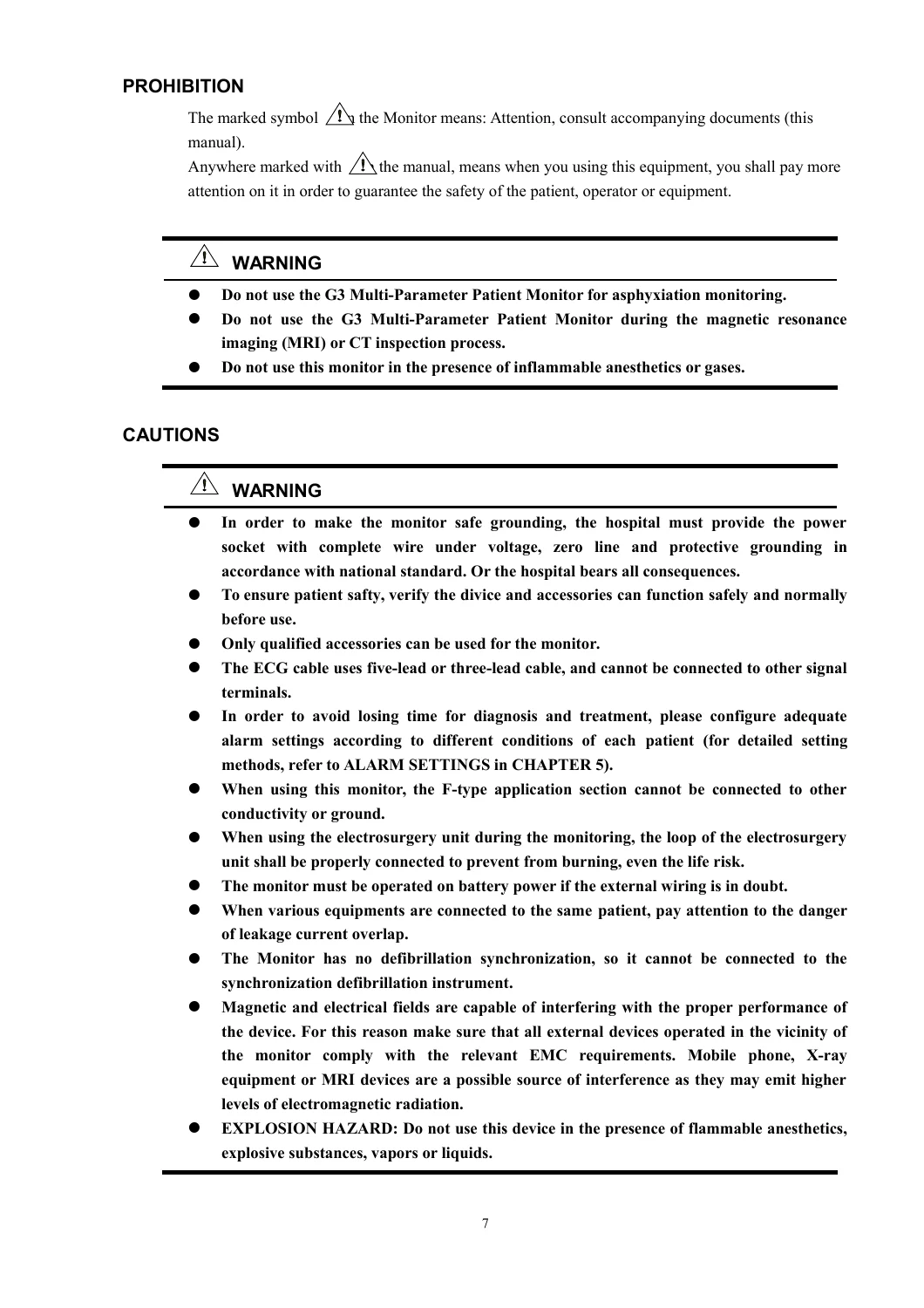
- Overview & Safety Information: Introduction, safety classifications, prohibitions, cautions, and contraindications for the G3 monitor.
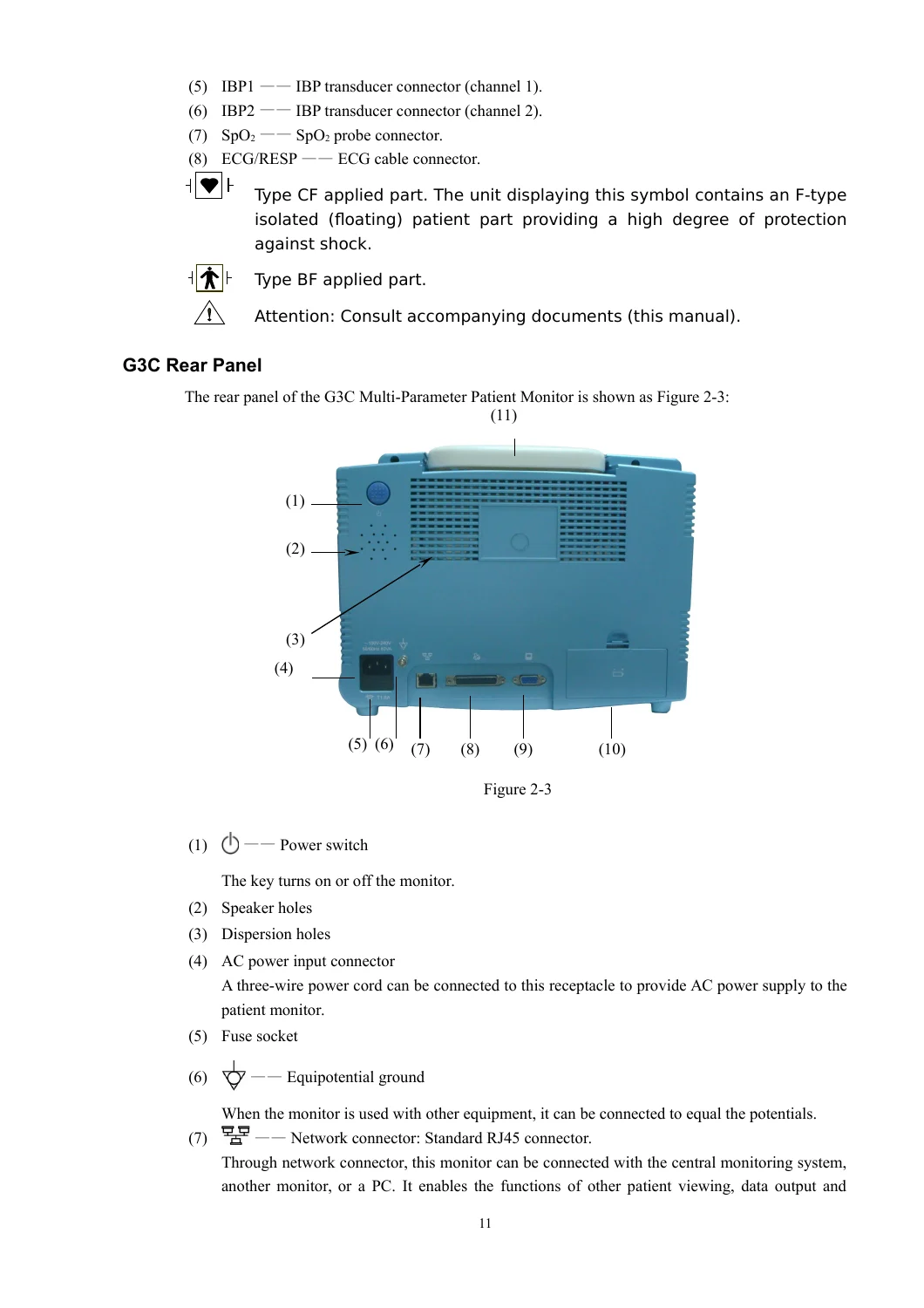
- Product Introduction: Detailed external appearance of G3C, G3D, G3F, and G3G models, including front panel controls, side and rear panel connectors, display interface, and battery specifications.
- Installation Procedures: Unpacking, environmental requirements, AC power connection, battery installation, equipotential grounding, connecting patient sensors and probes, network cable setup, VGA monitor connection, fuse replacement, and power-on/off sequences.
- Menu System & Configuration: Full menu operation, display settings (fixed format, user format, oxyCRG graph), alarm limits, waveform speed, tools (events, drug calculator, other patient viewing), patient information entry, system setup (time/date, regional settings, network configuration, maintenance, default settings), and recorder setup.
- Alarms: Alarm categories (physiological and prompt), visual and audible alarm indications, alarm settings via the alarm key and parameter labels, and procedures for managing alarms.
- Waveform Freezing & Recalling: Freezing/unfreezing waveforms, saving and recalling frozen waveforms, and navigating through historical waveform data.
- Printing: Overview of the built-in thermal printer, real-time, timer, and alarm printing types, installing printer paper, and configuring print parameters.
- Trends: Trend channels (graph and table), trend windows (graph and table), selecting parameters, navigating, and adjusting step and range.
- Events: Recording events (e.g., dose taking, injections) and browsing event marks on trend graphs.
- Drug Calculator: Comprehensive drug calculator for intravenous infusion, including unit selection, known item calculation, drip and titration tables, and preset drug dosage ranges.
- Other Patient Viewing: Viewing waveforms and parameters from another monitor on the same LAN network.
- ECG Monitoring: Complete section on ECG monitoring, including preparation, electrode placement (5-lead and 3-lead), ECG channels (main lead and other leads), heart rate, ST segment analysis, and troubleshooting.
- RESP Monitoring: Impedance respiration monitoring, electrode placement, RESP channel setup, respiration rate calculation, and troubleshooting.
- T-RESP Monitoring: Nasal tube respiration monitoring channel and menu.
- NIBP Monitoring: Non-invasive blood pressure monitoring, including cuff selection and placement, measurement limitations, monitoring interface, functions (manual, auto, continuous modes), venipuncture, and troubleshooting.
- TEMP Monitoring: Temperature probe installation, parameter display, TEMP menu configuration, and maintenance.
- SpO2 Monitoring: Oxygen saturation monitoring principles, precautions, monitoring procedure, PLETH menu, and maintenance.
- IBP Monitoring: Invasive blood pressure monitoring, including IBP channels, parameter display, zeroing the transducer, gain modes, and maintenance.
- CO2 Monitoring: Capnography monitoring (EtCO2 and FiCO2), procedure, channel and parameter configuration, and maintenance.
- Maintenance: Inspection, cleaning, disinfection, and sterilization guidelines.
- Labels, Packaging, Transport & Storing: Product and packaging labels, packaging specifications, and environmental storage requirements.
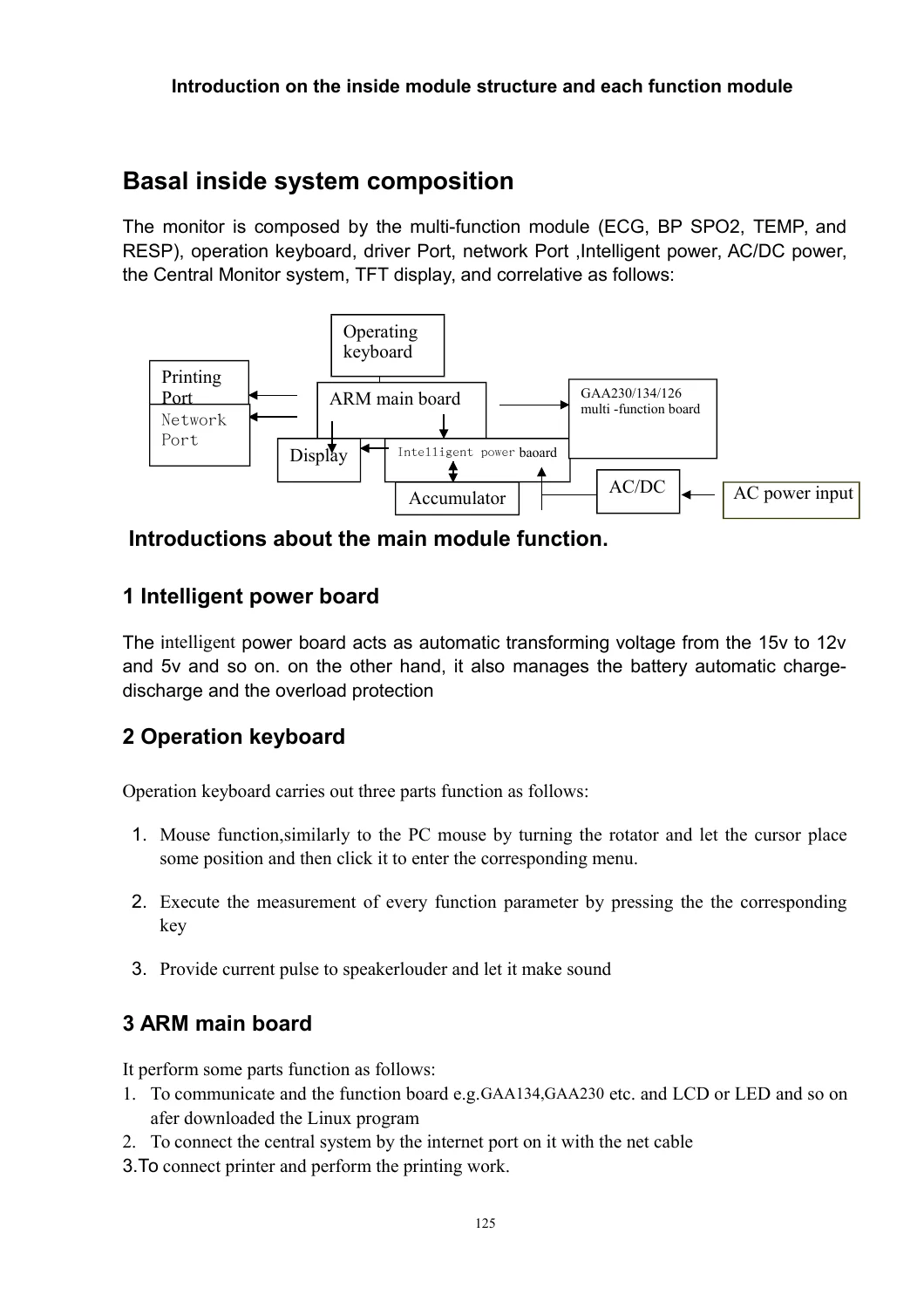
- Inside Structure & Troubleshooting: Basal inside system composition (intelligent power board, operation keyboard, ARM main board, GAA230/GAA134 multi-function module) and comprehensive troubleshooting tables for common issues.
- Product Specifications & EMC: Complete technical specifications for all parameters (ECG, RESP, NIBP, TEMP, SpO2, PR, IBP, CO2) and electromagnetic compatibility (EMC) guidance.
This manual isn’t just a list of chapters; it’s a complete workshop toolkit. It empowers you to perform accurate calibration, detailed troubleshooting, and full preventative maintenance on the G3 monitor’s core subsystems: ECG, respiration (both impedance and nasal), non-invasive and invasive blood pressure, temperature, pulse oximetry, and capnography. The detailed electrical schematics and component-level information in the appendices are invaluable for advanced repairs.
Key Features & Benefits
- Official Factory Information: Direct from General Meditech, Inc., this manual contains the same procedures and specifications used by authorized service centers.
- Comprehensive Troubleshooting: Detailed tables help diagnose and resolve “No Signal”, “ECG Noise”, “NIBP Measurement Failures”, and other common technical issues.
- Exact Specifications: Find precise specifications for every parameter, including measurement ranges, precisions, alarm tolerances, and environmental requirements.
- Procedural Clarity: Step-by-step instructions for zeroing IBP transducers, performing NIBP venipuncture, replacing fuses, managing batteries, and cleaning/disinfecting the equipment.
- Configuration Mastery: Master the full menu system – from setting up network connections for central monitoring to customizing display formats and setting robust alarm limits.
- Component-Level Detail: The manual includes internal structure diagrams, function board layouts, and a detailed Bill of Materials (BOM) for the GAA718 function board, enabling deep-level hardware troubleshooting.
Why You Need This Manual
In a critical care environment, accurate patient monitoring is non-negotiable. Having the correct service manual means the difference between a quick, precise repair and potentially costly downtime or, worse, inaccurate patient data. This manual ensures you have the right procedures for calibrating blood pressure, correctly setting ECG gain modes, and interpreting alarm limits.
It covers the full gamut of service tasks, from routine inspections and cleaning to complex diagnostic procedures for the internal printed circuit boards. The inclusion of EMC guidance ensures the monitor operates correctly even in the demanding electromagnetic environments of modern hospitals.
Instant Delivery
This product is a downloadable PDF file. After payment, you will receive immediate access to the manual. No shipping costs, no waiting for delivery, and no risk of lost or damaged physical copies. You can view the manual on your computer, tablet, or phone, or even print specific sections you need for the workshop.
Invest in the knowledge to keep your General Meditech G3 Patient Monitor performing at its best. Whether you are a seasoned biomedical technician or a hospital service professional, this General Meditech G3 Patient Monitor Service Manual (2009) is the definitive guide for ensuring accurate, reliable patient monitoring.


Reviews
There are no reviews yet.