
Canon CXDI-70C Wireless Service Manual PDF Download
Original price was: $42.95.$25.95Current price is: $25.95.
Canon cxdi-70c wireless service manual covering CXDI-70C Wireless. 150-page PDF with 1 — Overview, 2 — Installation procedures, 3 — Description of Functions, 4 — Repair Guide and detailed service/reference material.
Description
CXDI-70C Wireless Service Coverage
Canon’s CXDI-70C Wireless service manual covers the detector system from installation and functional description through repair, parts, troubleshooting, tools and inspection. The manual also fixes the supported hardware baseline at detector, X-ray interface box and AC/DC box body No. 100001 or later and documents both wireless and wired configurations.
Nine-Chapter Service Structure
The document identifies the following applicability or named equipment:
- CXDI-70C Wireless
Installation, Repair and Firmware Work
The manual is organised around these top-level sections and repair groups:
- 1 — Overview
- 2 — Installation procedures
- 3 — Description of Functions
- 4 — Repair Guide
- 5 — Parts Catalog
- 6 — Troubleshooting
- 7 — Service Manual Report
- 8 — Tools
- 9 — Appendix
Troubleshooting and Inspection Support
Across those sections, the work is centred on the following systems and service subjects:
- CXDI-70C system overview and system diagrams
- wireless and wired system configurations
- CXDI image-processing flow
- detector, power, LAN, environmental, PC, wireless, infrared, battery, charger, grid and wiring-unit specifications
- installation restrictions, product configuration, unpacking and installation procedure
- unit connections, startup/shutdown, X-ray-generator interfacing, software settings, image-quality checks and outline drawings
- detector, X-ray interface box and optional wiring-unit functions
- X-ray interface box and wiring-unit disassembly/reassembly
- PCA-FE and PCA-XIF firmware updating and recovery
- parts catalog information
- troubleshooting flow, wireless communication checks, GUI/system-error response, no-X-ray-exposure checks and data collection
- special tool list and inspection check sheet
Practical tasks supported by the procedures include:
- install the detector system with wireless or wired connection and observe patient-environment restrictions
- connect the detector, X-ray interface box and optional wiring unit
- configure CXDI Control Software NE and wireless LAN channels
- perform post-installation and image-quality checks
- replace PCA-XIF and PCA-PB boards and the AC/DC power supply using the repair-guide sequence
- update or recover PCA-FE and PCA-XIF firmware
- trace troubleshooting flow for system errors, wireless communication trouble and no-X-ray-exposure conditions
- collect log and quality-control data for secondary troubleshooting
- carry out calibration, self-diagnosis and performance-test checks listed in the appendix
Detector and System Specifications
Among the measurable values and reference points printed in the manual are:
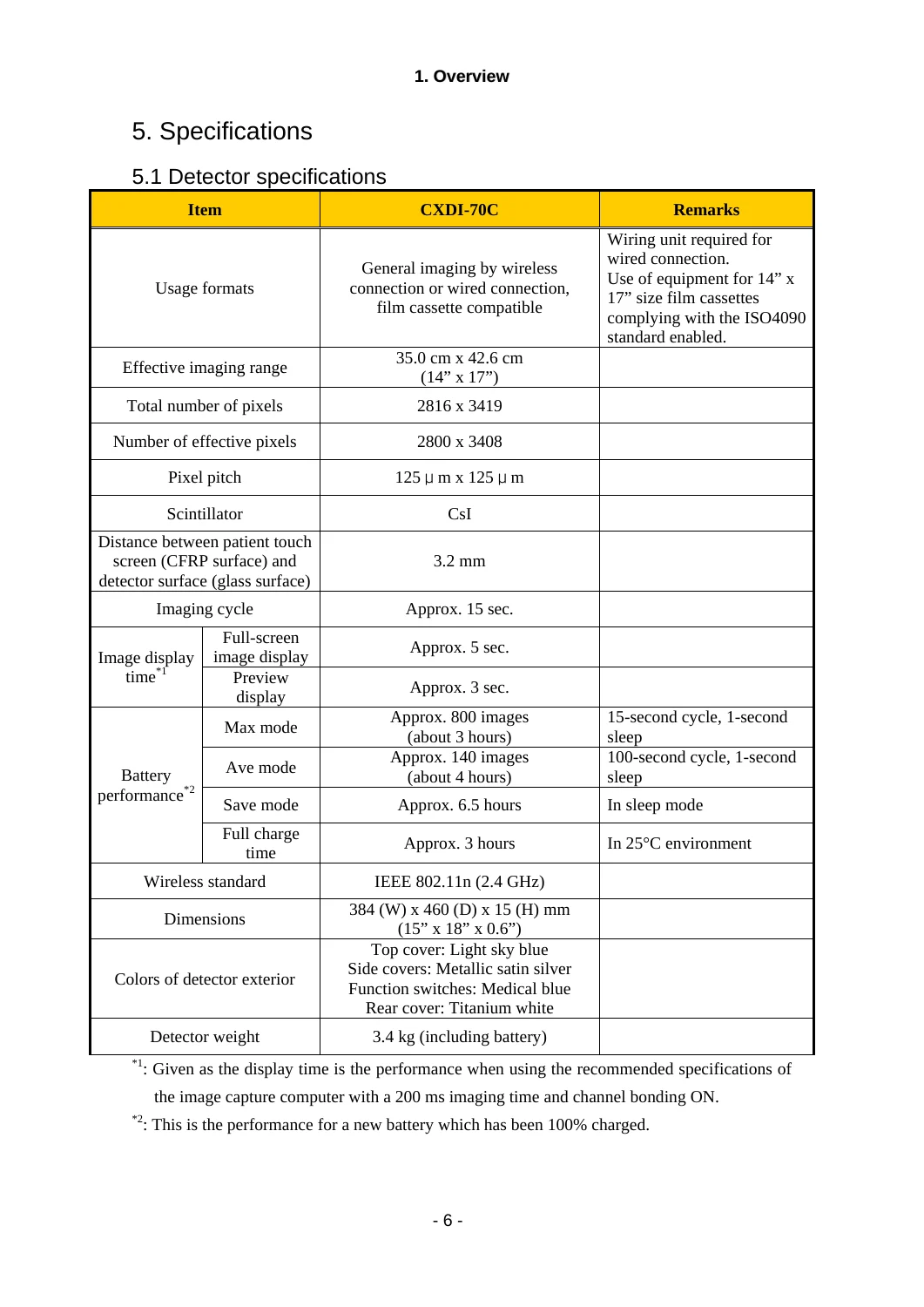
- Effective imaging range: 35.0 cm × 42.6 cm (14 × 17 in)
- Total pixels: 2816 × 3419
- Effective pixels: 2800 × 3408
- Pixel pitch: 125 μm × 125 μm
- Scintillator: CsI
- Imaging cycle: approx. 15 sec
- Full-screen display: approx. 5 sec; preview: approx. 3 sec
- Wireless standard: IEEE 802.11n (2.4 GHz)
- Dimensions: 384 (W) × 460 (D) × 15 (H) mm
- Detector weight: 3.4 kg including battery
- Battery max mode: approx. 800 images / about 3 hours
- Battery average mode: approx. 140 images / about 4 hours
- Battery save mode: approx. 6.5 hours
- Full charge time: approx. 3 hours at 25°C
- Detector load: 1.47 kN (150 kgf) over entire surface for 1 minute; 0.98 kN (100 kgf) local load, 40 mm diameter for 1 minute
- Control software: CXDI Control Software NE Ver.1.20 and up supported
- Allowable detector-panel temperature: max. +45°C
For buyers comparing this manual with a shorter overview, the depth comes from the way its named sections connect to real workshop subjects. 1 — Overview is part of the documented coverage, alongside CXDI-70C system overview and system diagrams. 2 — Installation procedures is part of the documented coverage, alongside wireless and wired system configurations. 3 — Description of Functions is part of the documented coverage, alongside CXDI image-processing flow. 4 — Repair Guide is part of the documented coverage, alongside detector, power, LAN, environmental, PC, wireless, infrared, battery, charger, grid and wiring-unit specifications. 5 — Parts Catalog is part of the documented coverage, alongside installation restrictions, product configuration, unpacking and installation procedure. 6 — Troubleshooting is part of the documented coverage, alongside unit connections, startup/shutdown, X-ray-generator interfacing, software settings, image-quality checks and outline drawings. 7 — Service Manual Report is part of the documented coverage, alongside detector, X-ray interface box and optional wiring-unit functions. 8 — Tools is part of the documented coverage, alongside X-ray interface box and wiring-unit disassembly/reassembly. 9 — Appendix is part of the documented coverage, alongside PCA-FE and PCA-XIF firmware updating and recovery. The coverage is therefore not limited to a single repair operation; it follows the document’s own section structure and keeps related inspection, adjustment and reference material in the same PDF.
The procedures also show the kinds of jobs for which the manual can be kept open beside the equipment. A technician can use the manual for install the detector system with wireless or wired connection and observe patient-environment restrictions. A technician can use the manual for connect the detector, X-ray interface box and optional wiring unit. A technician can use the manual for configure CXDI Control Software NE and wireless LAN channels. A technician can use the manual for perform post-installation and image-quality checks. A technician can use the manual for replace PCA-XIF and PCA-PB boards and the AC/DC power supply using the repair-guide sequence. A technician can use the manual for update or recover PCA-FE and PCA-XIF firmware. A technician can use the manual for trace troubleshooting flow for system errors, wireless communication trouble and no-X-ray-exposure conditions. A technician can use the manual for collect log and quality-control data for secondary troubleshooting. A technician can use the manual for carry out calibration, self-diagnosis and performance-test checks listed in the appendix. These are the actual work areas represented in the document, so the buyer can use the manual to move from component identification into the relevant removal, inspection, adjustment, test or installation material without substituting an unrelated model reference.
Reference values matter most when a repair reaches the checking stage. The reference data includes Effective imaging range: 35.0 cm × 42.6 cm (14 × 17 in). The reference data includes Total pixels: 2816 × 3419. The reference data includes Effective pixels: 2800 × 3408. The reference data includes Pixel pitch: 125 μm × 125 μm. The reference data includes Scintillator: CsI. The reference data includes Imaging cycle: approx. 15 sec. The reference data includes Full-screen display: approx. 5 sec; preview: approx. 3 sec. The reference data includes Wireless standard: IEEE 802.11n (2.4 GHz). The reference data includes Dimensions: 384 (W) × 460 (D) × 15 (H) mm. The reference data includes Detector weight: 3.4 kg including battery. The reference data includes Battery max mode: approx. 800 images / about 3 hours. The reference data includes Battery average mode: approx. 140 images / about 4 hours. The reference data includes Battery save mode: approx. 6.5 hours. The reference data includes Full charge time: approx. 3 hours at 25°C. The reference data includes Detector load: 1.47 kN (150 kgf) over entire surface for 1 minute; 0.98 kN (100 kgf) local load, 40 mm diameter for 1 minute. The reference data includes Control software: CXDI Control Software NE Ver.1.20 and up supported. The reference data includes Allowable detector-panel temperature: max. +45°C. The figures belong to the same manual as the procedures above, which makes them useful for verifying the documented setup, limit, clearance, pressure, dimension, torque or operating condition where that type of value is supplied.
Document Details
- Manual type: Service / Repair / Installation
- Brand / model: Canon — CXDI-70C Wireless
- Language: English
- Page count: 150
- File format: PDF
- Document number: Manual Control No. BY8-2310-0E0
- Publication / issue: Jan. 2012
- Revision: Rev.04a
Use the Correct CXDI-70C Service Data at the Point of Work
For CXDI-70C installation, board replacement, firmware recovery, wireless fault tracing and post-service checks, this manual puts the system diagrams, procedures, specifications and inspection steps in one service reference. Using the documented sequence is especially important where patient-environment restrictions, detector handling, calibration and communication settings intersect. The PDF is delivered instantly once payment completes—no shipping and no waiting—and can be viewed on phone, tablet, laptop or service PC or printed for bench use.
Reviews
There are no reviews yet.