Kodak DryView 8100 Laser Imager Service Manual Medical Imaging Printer PDF
Original price was: $85.00.$20.95Current price is: $20.95.
Complete factory service manual for Kodak DryView 8100 Laser Imager medical film printer. Professional technical documentation covering installation, troubleshooting, calibration, and repair procedures for this dry-film laser imaging system. Includes detailed circuit diagrams, assembly instructions, preventive maintenance schedules, and component replacement procedures. Essential resource for biomedical technicians servicing radiology departments with 14×17 inch dry film output from DICOM networks, PACS systems, and medical imaging modalities.
Description
Kodak DryView 8100 Laser Imager Service Manual Medical Imaging Printer PDF DOWNLOAD
DESCRIPTION
This official Kodak DryView 8100 Laser Imager Service Manual provides comprehensive technical documentation for the installation, calibration, troubleshooting, and repair of Kodak’s professional medical imaging laser printer system. This extensive 466-page manual (Revision J, July 2005) is essential for biomedical equipment technicians, medical imaging service engineers, and radiology department technical staff responsible for maintaining dry-film laser imaging equipment in healthcare facilities.
System Overview
The Kodak DryView 8100 Laser Imager is a professional medical imaging system designed to produce high-quality 14 inch x 17 inch diagnostic film prints from digital medical imaging sources. This laser-based dry-film printer eliminates the need for traditional wet chemical film processing, providing clean, reliable, and environmentally-friendly hard-copy output for radiology departments, imaging centers, and medical facilities.
Primary Medical Applications:
- Radiology film output from digital imaging systems
- DICOM network printing from PACS (Picture Archiving and Communication System)
- Diagnostic imaging hard copy production
- Medical documentation for patient records
- Multi-modality imaging output (CT, MRI, CR, DR, ultrasound, nuclear medicine)
Key Technology:
- 50 milliwatt laser imaging system
- Dry thermal imaging technology (no wet chemistry required)
- 14 inch x 17 inch film size (standard medical imaging format)
- Digital and analog input capability
- Automated image quality control system
System Specifications
Physical Dimensions:
- Height: 1168 mm (46 in.) with top cover closed; 1581 mm (62.25 in.) with top cover open
- Width: 635 mm (25 in.)
- Depth: 660 mm (26 in.) with front door closed; 1245 mm (49 in.) with front door open
- Weight: 188 kg (414 lbs)
Electrical Power Requirements:
- Multiple input voltage options with transformer jumper configuration
- Line-matching accomplished by jumpers on power transformer
- Fuse protection with specific ratings
- Grounded power connection required
Operating Environment:
- Controlled temperature and humidity requirements
- Environmental effects monitoring
- Installation spacing requirements (minimum 1.83 meters from patient bed/chair)
- Not suitable for use in presence of flammable anesthetics, oxygen, or nitrous oxide
Storage Environment:
- Specific temperature and humidity ranges
- Proper storage conditions for equipment protection
Film Specifications:
- Film Type: Kodak DryView Laser Imaging Film
- Film Size: 14 inch x 17 inch (standard radiology format)
- Film Throughput: Specified production rates for clinical workflow
Image Input Options
The DryView 8100 accepts input from various medical imaging sources (one at a time):
Digital Input:
- DICOM Network through Kodak PACS Link systems
- Direct digital connection from imaging modalities
- Standard digital interface for networked environments
Analog Input:
- Video source direct connection capability
- Analog imaging device compatibility
PACS Integration:
- Kodak PACS Link 9410 Acquisition System integration
- Kodak PACS Link 9405 Print Server compatibility
- Kodak PACS Link Medical Image Manager 200 (MIM 200) support
- Kodak PACS Link 25 Print Server connectivity
Control Source Options
Control Interfaces:
- Host controller connectivity
- Network control through PACS systems
- Standalone operation capability
- Multiple cable connection options
Comprehensive Manual Contents
REVISION HISTORY & DOCUMENTATION
- Original issue: October 1999 (Revision A)
- Current revision: July 2005 (Revision J)
- Section-by-section revision tracking
- Change bars indicating updated content
- Complete revision configuration table
SAFETY & COMPLIANCE INFORMATION
Critical Safety Warnings:
⚠ HIGH VOLTAGE HAZARDS
- Hazardous voltage present – can shock, burn, or cause death
- Wall plug removal required before servicing
- Grounded outlet connection mandatory
- Power cord protection and proper routing
- No extension cords permitted
- Original power cord use only
- Portable power strip mounting requirements
⚠ LASER SAFETY
- 50 milliwatt laser system
- Laser radiation present with rear cover removed
- Authorized service personnel only for rear cover access
- Eye damage risk with improper procedures
- Class-specific laser safety compliance
⚠ MECHANICAL HAZARDS
- Moving parts accessible to users
- Loose clothing, jewelry, and long hair risks
- Safety interlock systems required
- No operation with covers open
- Minor injury or equipment damage prevention
⚠ ENVIRONMENTAL RESTRICTIONS
- Not sealed cabinet – liquid exposure prohibited
- No bodily fluid contact permitted
- Flammable anesthetic restriction
- Non-gas-sealed electronics enclosure
⚠ INSTALLATION REQUIREMENTS
- Medical device connectivity guidelines
- Qualified service personnel only
- Minimum 1.83 meter patient separation distance
- Licensed healthcare practitioner sale restriction (U.S. Federal law)
⚠ FCC COMPLIANCE
- Class A digital device certification
- FCC ID: PA4810082007E2537
- EMC compliance requirements
- Radio frequency interference guidelines
- Installation and use per instructions
⚠ ESD PROTECTION
- Anti-static wrist strap mandatory for circuit board handling
- Component protection procedures
- Proper handling protocols for electronic components and EPROMs
SECTION 1: SPECIFICATIONS Complete technical specifications including:
- Dimensional data (height, width, depth, weight)
- Electrical power requirements and transformer jumper configuration
- Storage environment parameters
- Operating environment conditions
- Environmental effects documentation
- Film size specifications (14″ x 17″)
- Film throughput rates
- Image input options (digital, analog, DICOM)
- Control source options
- Cable specifications and requirements
- Technical glossary with definitions
SECTION 2: INSTALLATION
Complete installation procedures:
Installation Checklist:
- Step-by-step installation procedure list
- Required tools and equipment
- Personnel qualification requirements
- Safety verification steps
Unpacking and Initial Setup:
- Opening shipping crate procedures
- Dock personnel procedures
- Kodak-trained technician requirements
- Initial equipment inspection
- Component verification
Connection Procedures:
- Digital source direct connection to imager
- DICOM network through PACS Link systems
- Video source direct connection
- Host controller connection procedures
- Network configuration and setup
- Cable routing and management
System Configuration:
- Video setup procedures (C:\Program Files\Kodak Health Imaging\DryView 8100 MPC Add-ons\Video Setup)
- Network parameter configuration
- PACS integration setup
- TFTP boot configuration for 8100 Laser Imager
- System verification procedures
SECTION 3: ADJUSTMENTS & CALIBRATION
Precision adjustment procedures:
Processor Adjustments:
- Film Diverter Assembly (Stripper) adjustment
- Optics Translation Speed calibration
- SOP Delay timing adjustment
- Processor interface calibration
Quality Control:
- Densitometer reference level calibration
- Image quality verification
- Automatic image quality control system
- Test pattern verification
- Density measurement procedures
System Alignment:
- Laser optical system alignment
- Film transport mechanism adjustment
- Thermal processing calibration
- Output quality verification
SECTION 4: THEORY OF OPERATION
Detailed functional descriptions:
Film Processor Assembly:
- Processor Interface Board operation
- Film transport mechanisms
- Thermal processing system
- Film path design
- Stripper mechanism operation
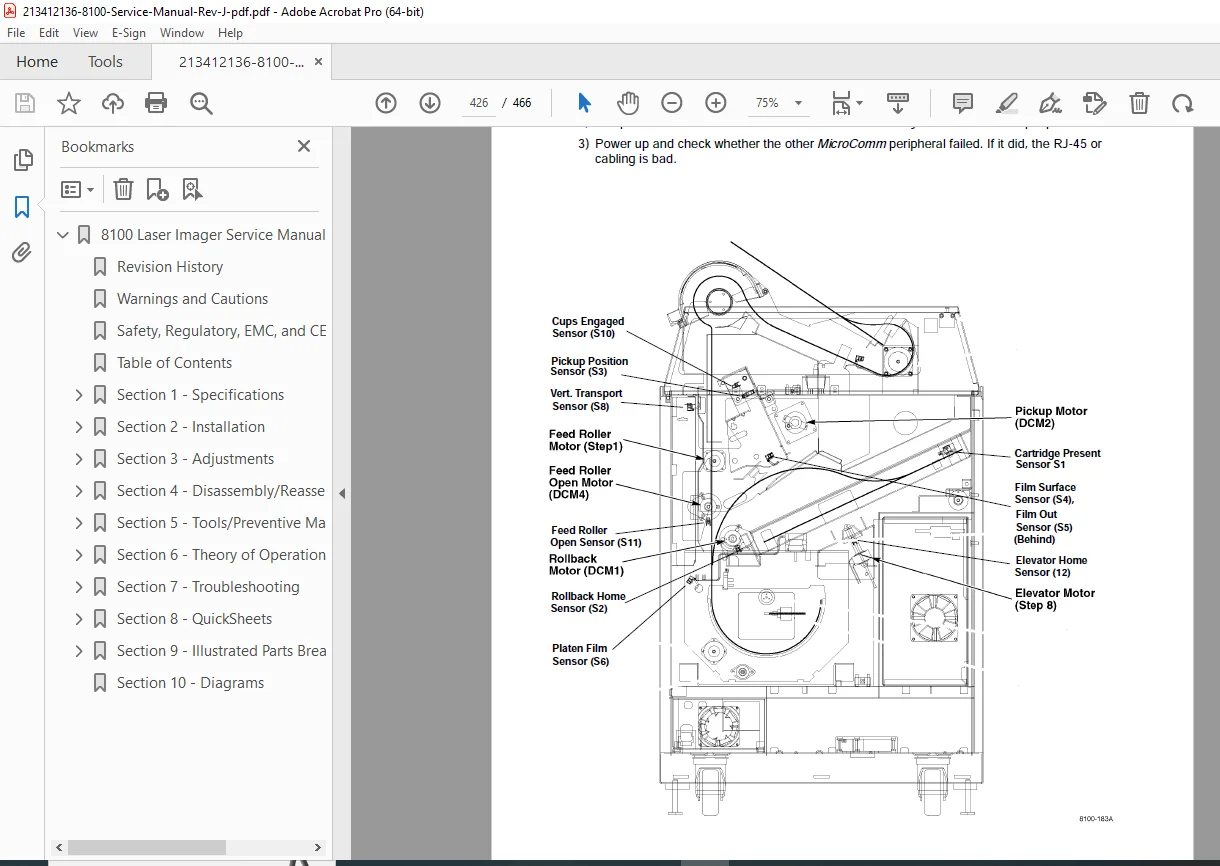
- Component interaction diagrams
Laser Imaging System:
- Laser diode operation
- Optical scanning system
- Image formation process
- Pixel addressing and control
- Intensity modulation
Control Systems:
- Machine Control System operation
- Image Management System functionality
- Data flow and processing
- System state management
- Error detection and handling
Interface Electronics:
- Digital input processing
- Analog video processing
- Network communication
- DICOM protocol implementation
- Control signal processing
SECTION 5-7: TROUBLESHOOTING & REPAIR
Comprehensive diagnostic and repair procedures:
Systematic Troubleshooting:
- Problem identification methodologies
- Diagnostic flowcharts
- Component-level testing
- Signal tracing procedures
- Error code interpretation
Module Replacement:
- Circuit board removal and installation
- Processor assembly replacement
- Laser optical components
- Film transport mechanisms
- Power supply components
- Interface boards replacement
- Sensors and detectors replacement
Board Return Requirements:
- All replaced circuit boards must be returned to Kodak for rework
- Proper disposal procedures for boards containing lead
- Environmental compliance requirements
- Tracking and documentation procedures
TFTP Boot System:
- Using TFTP boot for 8100 Laser Imager (Section 7-8-15)
- Firmware recovery procedures
- Network boot configuration
- System recovery protocols
SECTION 8: PREVENTIVE MAINTENANCE
Scheduled maintenance procedures:
- Routine cleaning protocols
- Component inspection schedules
- Lubrication requirements
- Performance verification tests
- Consumables replacement intervals
- Log keeping and documentation
SECTION 9: CIRCUIT DIAGRAMS & SCHEMATICS
Complete technical documentation:
- Electrical schematics for all boards
- Block diagrams showing system architecture
- Signal flow diagrams
- Power distribution schematics
- Interface connections documentation
- Component location diagrams
- Wiring harness routing
SECTION 10: PARTS LIST & ORDERING
Comprehensive parts information:
- Complete parts list with part numbers
- Component descriptions
- Ordering procedures
- Replacement part specifications
- Cross-reference information
- Supplier contact information
Technical Glossary
The manual includes extensive definitions:
- Automatic Image Quality Control – Subsystem in laser imager for quality verification
- Image Management System – System handling overall print operations
- Machine Control System – Subsystem controlling printing processes
- PACS Link Systems – Kodak network integration solutions
- DICOM – Digital Imaging and Communications in Medicine standard
- Densitometer – Device for measuring optical density
- Medical imaging terminology
- Technical abbreviations and acronyms
External Cleaning & Maintenance
General Guidelines:
- Damp cloth with water and mild detergent
- Commercial electronic equipment cleaner approved
- Proper handling of medical equipment
- Environmental safety considerations
Regulatory Compliance
Certifications & Standards:
- FCC Part 15 Class A digital device compliance
- Safety standards per User Guide reference
- EMC compliance documentation
- CE marking information
- Medical device regulatory requirements
- Quality system certifications
Legal & Warranty Information
Disclaimers:
- Information based on Eastman Kodak Company knowledge prior to publication
- No patent license granted
- Right to change information without notice
- No warranty expressed or implied
- No liability for consequential or special damages
- Service by Kodak-trained technicians only
Part Modification Restrictions:
- No substitution or modification without Kodak approval
- Authorized service personnel requirements
- Original equipment manufacturer (OEM) parts only
Who Should Use This Manual?
- Biomedical equipment technicians (BMETs) specializing in imaging
- Medical imaging service engineers
- Kodak-trained service technicians
- Hospital radiology technical services staff
- Imaging center maintenance personnel
- Healthcare facility biomedical engineering departments
- PACS administrators with hardware responsibilities
- Medical equipment installation specialists
Manual Features
✓ Official Kodak factory service manual
✓ 466 pages of comprehensive technical documentation
✓ 10 detailed sections covering all service aspects
✓ Revision J (July 2005) – latest updated version
✓ Complete installation procedures
✓ Circuit diagrams and schematics
✓ Step-by-step troubleshooting guides
✓ Component replacement procedures
✓ Calibration and adjustment protocols
✓ Preventive maintenance schedules
✓ DICOM/PACS integration instructions
✓ Safety warnings and regulatory compliance
✓ Parts lists with ordering information
✓ Change bars indicating updated content
This service manual provides biomedical technicians with complete factory-level technical knowledge for maintaining and repairing Kodak DryView 8100 Laser Imager systems, ensuring reliable operation of critical medical imaging hard-copy output equipment in healthcare environments.
FILE DETAILS
Manual Name: Kodak DryView 8100 Laser Imager Service Manual
Model Covered: Kodak DryView 8100 Laser Imager
Year: July 2005 (Revision J)
Manual Quality: Excellent – Clear text, detailed diagrams, professional formatting
Number of Pages: 466 pages
File Format: PDF
File Size: 10.8 MB
Language: English
Publication Number: 1584010, 96-0000-0211-1
Revision: Rev. J (07/05)
Publisher: Eastman Kodak Company
Original Issue: October 1999 (Revision A)