
Konica Minolta CS-1 CS-2 CS-3 REGIUS MODEL 110 Installation & Service Manual
Original price was: $34.95.$19.95Current price is: $19.95.
Complete installation and service manual for the Konica Minolta CS-1, CS-2 and CS-3 consoles with REGIUS MODEL 110 cassette reader. Covers networking setup, calibration, error codes, the job manager job table and every Service Tool screen.
Description
Konica Minolta CS-1 CS-2 CS-3 REGIUS MODEL 110 Installation & Service Manual
This is the installation and service manual for the Konica Minolta CS-1, CS-2 and CS-3 operation consoles paired with the REGIUS MODEL 110 cassette reader. It is written for the field engineer who has to take a CR reader out of the crate, bring it onto the network, calibrate it against the X-ray room and keep it running afterwards. The manual is code-numbered 0801 and carries the document number 0801YF220B.
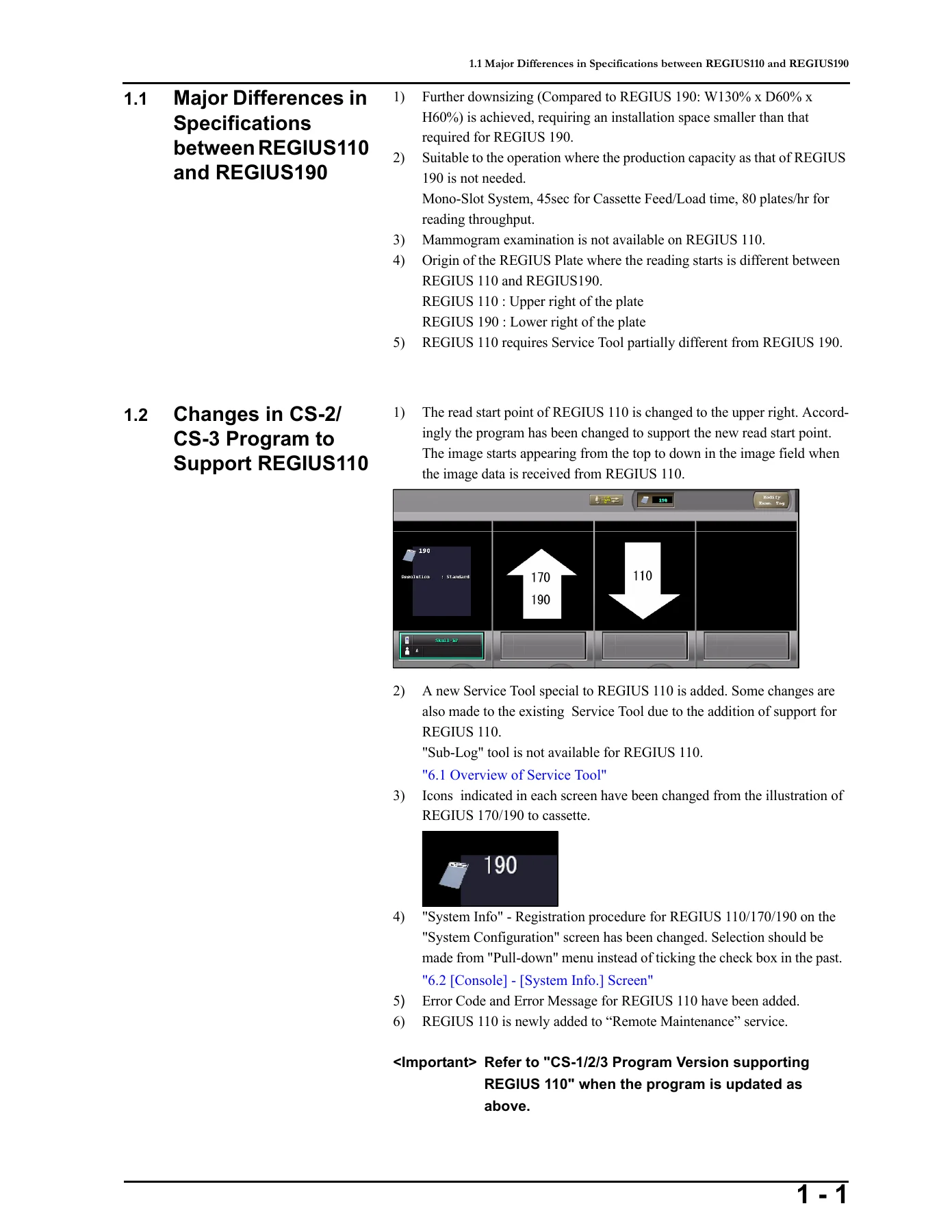
The document assumes you are already comfortable with the CS console software and with the REGIUS platform, so it concentrates on what is different about the REGIUS 110 and on the exact sequences that must be followed. That includes the read start point change, the version requirements on the consoles, the host name and IP conventions, and the Service Tool screens that only exist because of the 110.
File Details
- Manual type: Installation and Service Manual
- Brand: Konica Minolta Medical & Graphic, Inc.
- Equipment covered: CS-1, CS-2, CS-3 consoles; REGIUS MODEL 110 cassette reader
- Language: English
- Page count: 114 pages
- File format: PDF
- Document number: 0801YF220B
- Code number: 0801
- Publisher: Konica Minolta Medical & Graphic, Inc., Hachioji, Tokyo
Chapters Covered
- Chapter 1 — Overview
- Major differences in specifications between REGIUS 110 and REGIUS 190
- Changes in the CS-2 / CS-3 program to support REGIUS 110
- Specification comparison (main unit, usable cassettes, reading resolution, processing capacity, cropped image size)
- Restrictions and default values: supported CS program versions, host name and IP defaults, exam keys, IP address assignment
- REGIUS 110 error code list
- Job table of the Job Manager (jobs, commands, relations, console status, reader status, system configuration, reader version, reader log, JM information)
- Chapter 2 — Connecting CS-1/2/3 with REGIUS 110
- Flow of the setup procedure
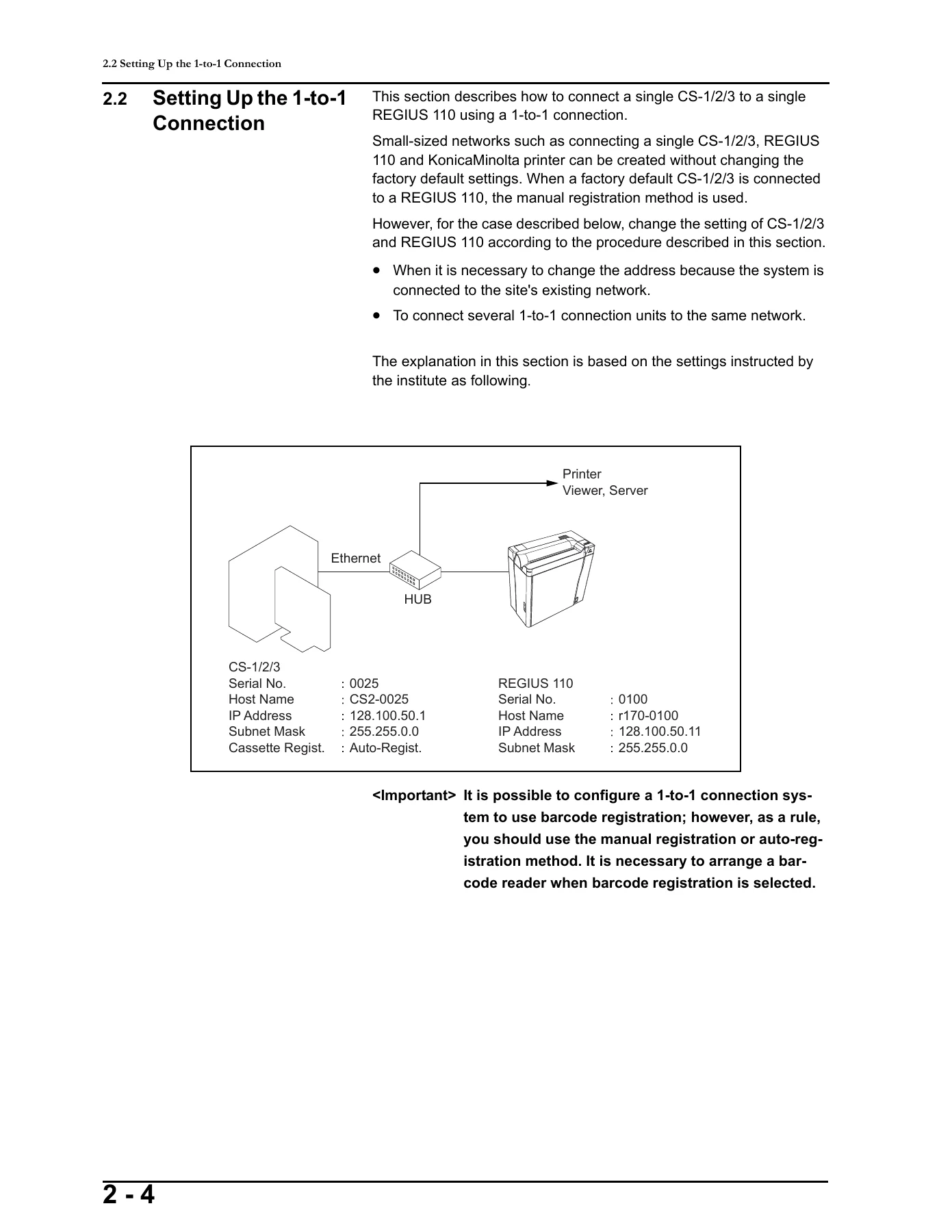
- Setting up the 1-to-1 connection: configuring the REGIUS 110 and configuring the CS-1/2/3
- Setting up the n-to-m connection: configuring the REGIUS 110, the CS-1/2/3 of the standard JM, and the CS-1/2/3 of the backup JM
- Chapter 3 — Verification & Backup of Setup Data
- Checking the image
- Backing up the reader setup data
- Backing up the CS-1/2/3 setup data
- Chapter 4 — Adjusting the REGIUS 110
- Checking image size and read start position
- Adjusting image size and read start position
- Unevenness calibration of the regular cassette
- Sensitivity calibration of the regular cassette
- Chapter 5 — Maintenance & Adjustment
- Upgrading the version of the REGIUS 110
- Chapter 6 — Service Tool Screens
- Overview of the Service Tool
- [Console] — [System Info.] screens
- [Reader] — [Reader] — Dedicated Reader / CCU INFO / TCP/IP
- [Reader] — [Device] and Table Management
- [Reader] — [PCB]
- [Reader] — [Std. Current]
- [Reader] — [Uneven. Cal.]
- [Reader] — [Sensitivity]
- [Reader] — [Reader Log]
- [Reader] — [Mech. Counter]
- [Reader] — [File Import] and [Upgrade]
- [Reader] — [Network]
Taken as a whole, this manual is the bridge between the CS console software and the REGIUS 110 hardware. Chapter 1 gives you the reference data you need before you touch anything: the full list of error codes and the Job Manager job table that tells you what every field on the console actually means. Chapter 2 is the procedure section, and it is deliberately written for two different site layouts — the single console / single reader installation and the multi-console, multi-reader network with a standard JM and a backup JM. Chapter 3 and Chapter 4 are the commissioning sequence: prove the image is correct, back up the reader data, then fine-tune the PLL magnification and read start position, run the unevenness calibration against the largest cassette in use, and run the sensitivity calibration. Chapter 5 covers the firmware upgrade path, and Chapter 6 is the screen-by-screen reference for every Service Tool panel.
What This Manual Lets You Do
The Konica Minolta CS-1 CS-2 CS-3 REGIUS MODEL 110 installation and service manual supports the whole commissioning workflow rather than just the unboxing. You can set the factory host name and IP address on a REGIUS 110 so it stops answering to the shipping default, register the reader in [System Info] → [System Config. (reader)], write the reader network information through the Service Tool [Network] screen in FTP mode, and then go into the PostgreSQL access tool to update c_status, r_status, r_version, relations and sys_config so the console and the reader actually recognize each other. On an n-to-m site you can build out the standard JM console first and then mirror the database onto the backup JM console through the [Restore] function, with the correct c_stat and r_stat values verified afterwards.
Once the network is up, the manual gives you the calibration procedures that decide whether the images are diagnostically usable. The unevenness calibration section specifies the exposure conditions — 80 kV fixed, 2 m or more plate-to-bulb distance, and an mAs value that puts the maximum data value in the 1500 to 3000 step window, typically 10 to 20 mAs at 2 m. The sensitivity calibration section specifies the standard 10 mR dose, the 0.94 sensitivity value for regular cassettes, and the automatic calculation from high resolution data that lets a single exposure produce both the 87.5 µm and 175 µm calibration tables. Image size and read start position checking is covered with the actual allowance figures, including the 2022 pixel ±10 pixel horizontal tolerance and the 33 ± 10 pixel margin window on the H-sync side.
For troubleshooting, the error code list runs the whole mechanical and signal chain: the justifier, receiver, elevator, transporter, subscan motor, insertion shutter, motor lock release, back plate detection, peel sensor, cassette insertion sensors, polygon rotation, erasure lamps, cooler fan and FPGA events, plus the 14000-series signal processing errors, the 23000 to 26900 program, network and operation errors, and the job manager connection and timeout errors.
Why It Matters
The REGIUS 110 does not behave exactly like the REGIUS 170 or 190 it replaces on smaller sites. The read start point has moved to the upper right of the plate instead of the lower right, the program on the CS-1/2/3 has to be at the right revision before the reader will talk to it, mammography is not supported on this reader, and the Service Tool has its own device setup screen and its own mechanical counter screen. Setting a reader up as a 170 or 190 in [System Config.] when it is actually a 110 is exactly the kind of mistake this manual is written to prevent, because the wrong reader selection can leave the reader function abnormal.
Working from the actual procedure also matters for the network side. Every REGIUS 110 leaves the factory with the same host name and the same IP address, so bringing up more than one reader on a hub at the same time before they have been individually configured will stop the consoles from telling them apart. The manual spells out the safe order — one reader connected at a time, configured, powered down, then the next — and that alone saves a lot of time on a multi-room install.
IMAGES PREVIEW
Instant PDF Delivery
This listing is for the PDF version of the manual. The file is delivered immediately after payment — there is no physical book, no shipping, and no waiting. You can open it on a laptop, tablet or phone, keep it on a USB stick in the service kit, or print the pages you need for the job in front of you. Because the whole document is indexed by chapter, you can jump straight to the error code you are chasing or the Service Tool screen you need, rather than working through the manual from the front.
Reviews
There are no reviews yet.