
Philips IntelliVue Information Center Installation Service Manual M315094230 2003
Original price was: $39.95.$24.95Current price is: $24.95.
Installation, configuration, maintenance, troubleshooting, and repair reference for Philips IntelliVue Information Center systems, covering M3150B, M3155B, M3151B, M3170, M3169A, and M3154B Release E.01.xx.
Description
Philips IntelliVue Information Center Installation Service Manual M315094230
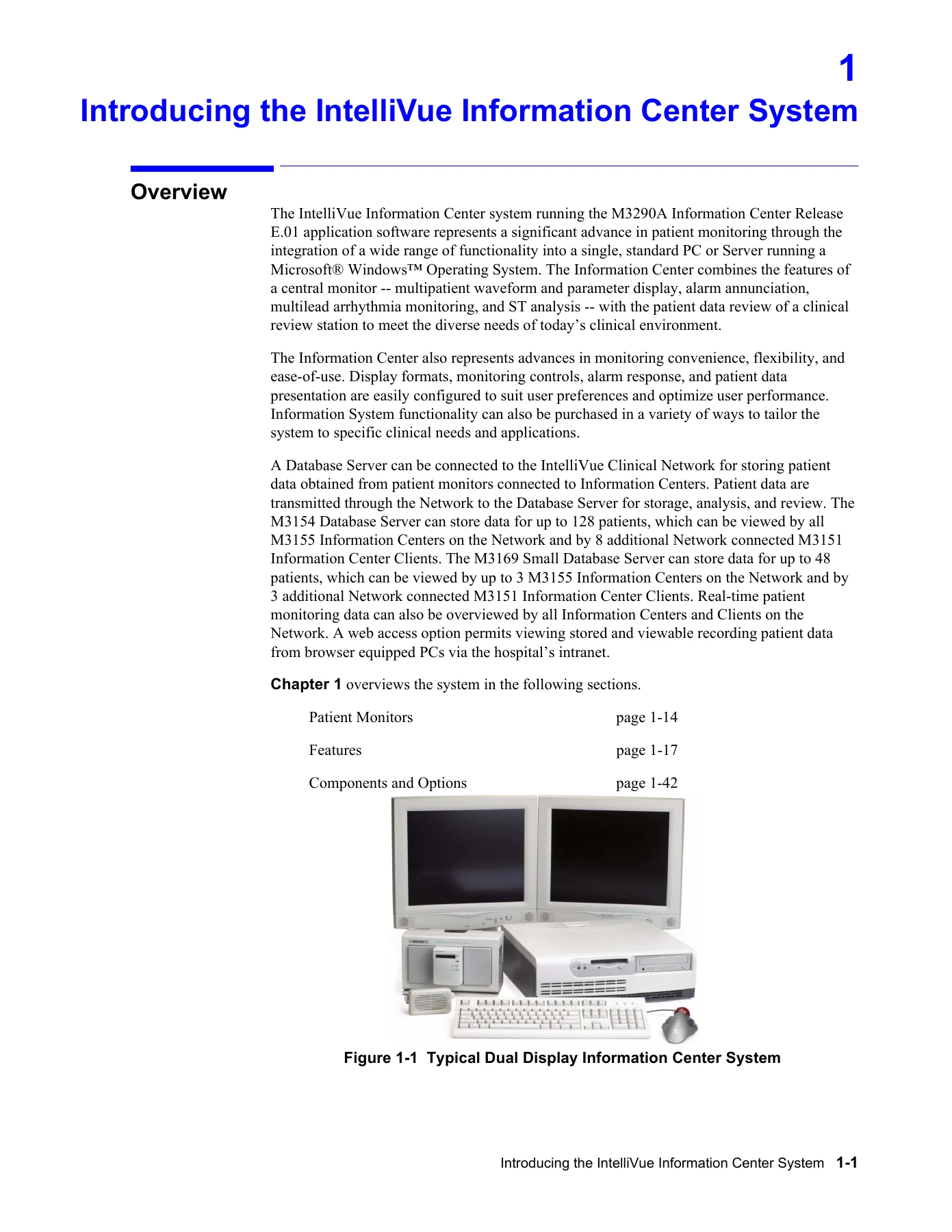
This Philips IntelliVue Information Center Installation Service Manual M315094230 is a detailed service and installation reference for the IntelliVue Information Center system running Release E.01.xx software. It brings together hardware descriptions, network planning, installation procedures, software configuration, maintenance, troubleshooting, repair, and product assurance testing for the M3150B Local Database Information Center, M3155B Network Database Information Center, M3151B Information Center Client, M3170 Patient Link, M3169A Small Database Server, and M3154B Database Server. The document is a Philips Medical Systems publication dated August 2003 and is intended for service personnel, installation engineers, and support staff who work with these patient monitoring systems.
File Details
- Manual type: Installation and Service Manual
- Brand: Philips Medical Systems
- System family: IntelliVue Information Center
- Document number: M315094230
- Edition and date: First Edition, August 2003
- Software release: Release E.01.xx
- Language: English
- Page count: 522 pages
- File format: PDF
Chapters Covered
- Introducing the IntelliVue Information Center System – overview, local database, network database, client, patient link, database server, topologies, Philips CareNet, patient monitors, features, clinical applications, upgrades, components, and options.
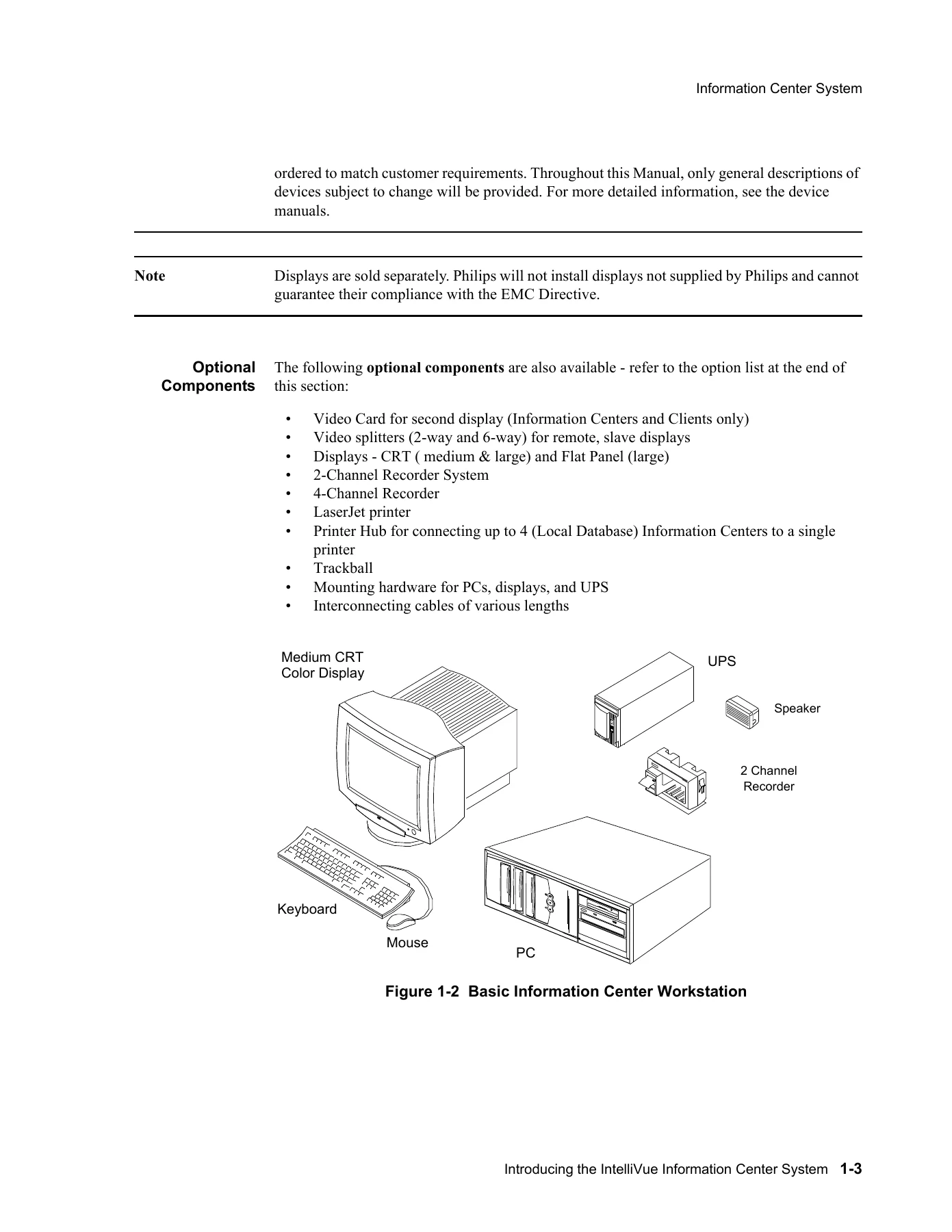
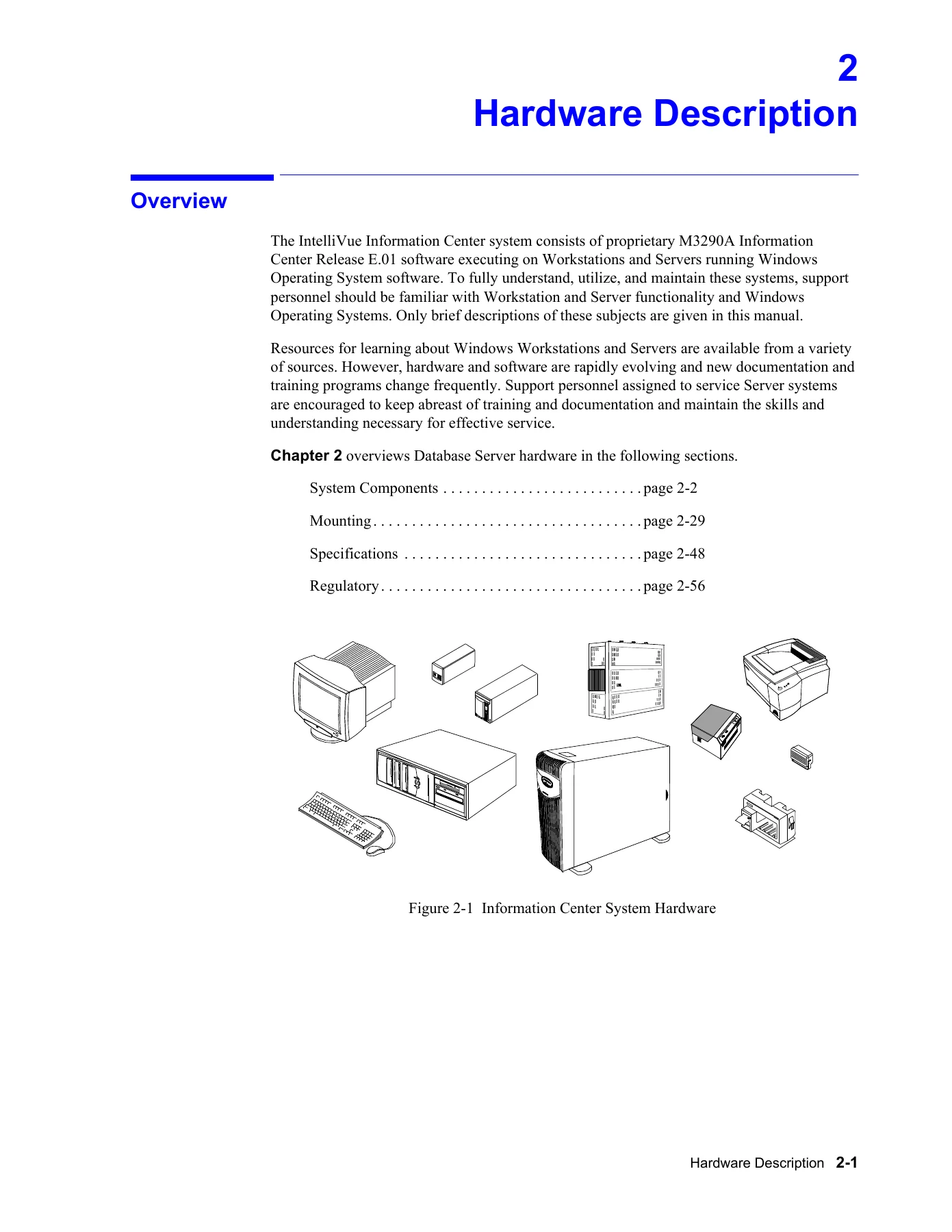
- Hardware Description – system components, PC workstations, M3154 Database Server, mouse and trackball, keyboard, displays, computer memory, hard drive, monitoring LAN, hospital LAN card, SDN and recorder interface card, audio card and speaker, CD ROM drive, floppy disk drive, video card, modem, RAID 5, panel descriptions, display options, remote slave displays, video splitters, keyboard-video-mouse switch, Philips recorder systems, speaker, optional 4-channel recorder, printer, printer hub, UPS, power distribution module, mounting, specifications, and regulatory information.
- Software Description – PC workstation platform, peripheral devices, Windows operating system, application programming interfaces, file system, registry, IntelliVue Information Center application software, monitoring mode, non-monitoring mode, architectural design, applications, management functions, services, Physio Data Server, Patient Database Services, Measurement Services, Alarm Services, SDN Data Acquisition Service, Recorder Management Services, Documentation Status Services, recorder documentation services, and printer documentation services.
- Site Planning and Preparation – site planning considerations, responsibilities, location, wiring closets, switches, server, UPSs, network design, clinical requirements, patient monitoring level, patient monitor type, central monitor type, central monitoring locations, patient data review locations, Philips hardware capability, patient monitors, CareNet, central monitoring stations, review stations, documentation stations, database server, small database server, printers, equipment capability, designing the system, design worksheets, design examples, database server systems, connecting devices, drawing the design, guidelines, directed messages, broadcast and multicast messages, site preparation, equipment location, typical installations, space and weight requirements, environmental requirements, electrical requirements, network connection, network card and TCP/IP settings, equipment cabling, safety, medical device standards, Philips device requirements, and patient environment.
- Hardware Installation – cable plant installation, installation materials, noise immunity, UTP cable plant installation, RJ-45 connections, fiber optic cable plant installation, unpacking and inspection, checking inventory, system serial number, service documentation, inspection, packaging inspection, mechanical inspection, electrical inspection, claims for damage, re-packaging for shipment, locating system components, components on the work surface, display swivel mount, keyboard mounting options, wall brackets, ceiling and wall mounts for displays, wall mounts for processing unit and UPS, wall mount for power distribution module, Information Center installation, D510 power switch cover, securing PC cables, M3169 Small Database Server installation, M3154 Database Server installation, server to hospital intranet, printer installation, interconnecting the system, D510 system, VL420 system, VL400 system, database server, ML370 G3, ML370 G2, LC2000, touch display, cable connections, touch display stylus and holder mount, touch display calibration, display controls, remote slave display wiring, printer hub, keyboard-video-mouse switch, providing electrical power, network names and IP addresses, IP address, subnet mask, default gateway, MAC address, host name, device name, setting host names and IP addresses, Information Centers, Clients, Patient Link, Small Database Server, M3154 Database Server, procedure for printers, testing network connectivity, and optional second network interface card settings.
- Software Installation and Configuration – introduction, large networks, time synchronization, software reinitialization, configuration, Config Wizard, restore from archive, backup logs, purchased options and support information, general configuration, network configuration, adding network devices, display setup, equipment setup, setup LBN procedure, setup monitor label procedure, setup switch procedure, bed config, report settings, report and recording destination, time and date setup, setup complete, activating the Database Server, and activating the Network/Server system.
- Maintenance, Troubleshooting, and Repair – overview, maintenance, surface cleaning, disabling the touchscreen for cleaning, cleaning agents, routine maintenance, workstations and server, UPS, display sweep speed, Philips 2-channel recorder, Philips 4-channel recorder, maintenance and handling, paper loading, clearing paper jams, troubleshooting symptoms, alert data export, patient data transfer and web access, HL7 export, web-based applications, 12-lead export and Holter export, troubleshooting strategy, SDN connectivity, server connectivity, system troubleshooting, user troubleshooting, error and status messages, status log, support information, service personnel troubleshooting, support logs, diagnostics, configurations, other services, shutdown, maintenance, event log, system error log files, system info log files, export log files, exception error log files, backup error logs, system events, service log, edit service log, view service log, archiving the service log, status log, quick unit status, all data categories, network statistics, switches, access points, telemetry services, revision, configuration, transmitters, ST parameters, error log, NBP alarm, diagnostics, software tools, ISDN and recorder diagnostics, recording and printing diagnostics, NT diagnostics, performance monitor, Windows Explorer, MSDOS command prompt, backup error logs, redirect HL7, service portal support, RAID utilities, configuration menu items, read only Config Wizard, archive, set time and date, report configuration, report and recording destination, add and remove database servers, patient data transfer bandwidth utilization, change units password, print configuration, other services, services, remote access admin, Internet Service Manager, User Manager, software versions, shutdown, desktop tools, maintenance, restart IIS Admin Service, restart DBServ, synchronize large network server list, reset database log, upgrade NLS catalogs, HL7 tools, client.exe tool, Qryclnt.exe tool, ST/AR configuration reporting tools, manual IIS settings, LED diagnostics, SDN LED diagnostics, LAN card LED diagnostics, repair, Philips hardware, UPS, UPS configuration, SDN interface card, Philips recorder, Philips software, rebooting the system, reinstalling software, ML370 G3 Database Server ILO configuration, updating BIOS, M3154 Database Server, ML370 G3, ML370 G2, LC2000, PCs, system setup, restoring printer configurations, adding printers to the network, restoring RAID configurations, recreating FIST bootable floppy disk, recreating Information Center BIOS disk, creating Server BIOS bootable floppy disk, replaceable parts, and software re-installation procedure.
- Testing Product Assurance – visual tests, system components, cables, connectors, power on test, turning on the equipment, observing software boot up, performance test, database storage test, power failure response test, setting display sweep speed, flat panel displays, verifying sweep speed accuracy, modem test, and test and inspection procedures for Information Centers and Clients, M3170 Patient Link, M3169 Small Database Server, M3154 Database Server, and Clinical Network.
- Worksheets – design and configuration overview, device installation, network configuration, equipment setup, patient data transfer and web access, web access requirements and specifications, passive infrastructure installation, TCP/IP network card configuration, security configuration, web operation from network PCs verification, and web users notification.
- Web Installation on the Database Server – overview, procedure, installing the Web NIC card, entering the NIC IP address, Web User Access Config Tool, clinician management, add clinicians, remove and view clinician list, change clinician password, viewing clinician assignments, view audit data, export audit data, and test and inspection.
- External Modem Installation – overview, external modem, RAS software, procedure, installing and configuring an external serial modem, reconfiguring RAS on Windows 2000 Server, testing RAS, and test and inspection procedures.
- Dial-In Procedure for Remote Access to Information Center Systems – overview, accessed server requirements, accessing PC requirements, dial out procedure, making the remote access connection, entering name and phone number on the accessing PC, mapping a drive to the remote PC, connecting to other networked devices connected to the DBS, using RAS, accessing the remote log files, accessing the remote event view system or application files, disconnecting the drives, disconnecting RAS, and test and inspection procedures.
- Data Export Installation on the Database Server – overview, procedure, installing the second NIC card, entering the NIC IP address, configure host name, test and inspection, and enabling the receiving system to receive exported data for data analysis on Windows NT, Windows 2000, Windows XP, Windows 98, and Windows ME.
- Demo Mode Installation Procedure – overview, installing Windows operating system, and IntelliVue Information Center Demo Mode software installation.
Across its chapters, this Philips IntelliVue Information Center Installation Service Manual M315094230 gives a technician a structured path from site planning and cable plant preparation through hardware placement, system interconnection, IP addressing, software reinitialization, Config Wizard sequencing, equipment setup, bed configuration, report and recording destinations, time synchronization, and full system activation. It also provides maintenance routines, troubleshooting tables, event and service logs, network statistics, LED diagnostics, BIOS and RAID restoration procedures, software reinstallation steps, and product assurance tests. The manual is especially useful where the work depends on exact model behavior, network roles, recorder and printer destinations, and the relationship between the Database Server, Information Centers, Clients, and Patient Link.
Installation Planning and Network Design
The planning chapters explain how to locate the Database Server, wiring closets, switches, UPSs, displays, recorders, and printers, and how to design the Clinical Network around bed count, monitoring level, monitor type, review locations, and future expansion. The manual includes design examples for small and large ICUs, stepdown units with telemetry, and telemetry monitoring without a System Communications Controller. It also covers cable plant installation, UTP and fiber optic considerations, RJ-45 connections, equipment cabling, electrical power, safety requirements, and the patient environment limits that affect where Information Center equipment may be placed.
Hardware and Software Configuration
The hardware and software sections identify the standard and optional components of the M3150B, M3155B, M3151B, M3170, M3169A, and M3154B systems, including processing units, displays, SDN and recorder interface cards, hospital LAN cards, audio cards, speakers, UPS units, recorder racks, printers, printer hubs, video splitters, and keyboard-video-mouse switches. The configuration chapters then walk through software reinitialization, Config Wizard order, Restore from Archive, Purchased Options and Support Information, General Configuration, Network Configuration, Display Setup, Equipment Setup, Bed Config, Report Settings, Report and Recording Destination, Time and Date Setup, and final activation of the Database Server and the Network/Server system.
Maintenance, Troubleshooting, and Repair
For ongoing service, the Philips IntelliVue Information Center Installation Service Manual M315094230 provides cleaning and routine maintenance guidance, recorder paper loading and jam clearing, UPS battery replacement recommendations, display sweep speed checks, and troubleshooting tables for alert data export, patient data transfer and web access, HL7 export, web-based applications, and 12-lead and Holter export. It explains how to use Event Log, Service Log, Status Log, Network Statistics, Telemetry Services, SDN and recorder diagnostics, recording and printing diagnostics, backup error logs, redirected HL7 output, RAID utilities, LED diagnostics, BIOS updates, ILO configuration, and RAID restoration.
Testing, Web Access, and Optional Data Export
The product assurance chapter gives visual, power-on, performance, database storage, power failure response, sweep speed, and modem tests, along with test and inspection matrices for Information Centers and Clients, Patient Link, Small Database Server, Database Server, and Clinical Network components. Separate appendix material covers web installation on the Database Server, external modem installation, dial-in remote access, data export installation, and demo mode installation. These sections help service personnel verify that patient data storage, review, printing, recording, web access, and optional export paths are working before the system is returned to clinical use.
Who This Manual Supports
This installation and service manual is aimed at Philips service providers, customer engineers, biomedical equipment technicians, and support personnel responsible for installing, configuring, maintaining, and troubleshooting IntelliVue Information Center systems. It is also useful for network and integration staff who need to understand how the Information Centers, Clients, Patient Link, Database Server, switches, access points, printers, and recorders fit together in a Philips Clinical Network. Because the document covers multiple model numbers and Release E.01.xx behavior, it is a practical reference when matching procedures to the exact device and configuration in front of you.
Get the Complete Installation and Service Reference
IMAGES PREVIEW
With this Philips IntelliVue Information Center Installation Service Manual M315094230, you can follow the installation sequence, plan the network, configure the software, set up beds and equipment, verify printing and recording destinations, troubleshoot system faults, and restore BIOS or RAID settings when service work demands it. The manual supports the jobs that matter most on these systems: correct hardware placement, accurate network and IP setup, reliable patient data storage and review, recorder and printer configuration, web access checks, data export setup, and product assurance testing. It is delivered as an instant PDF download, with no shipping and no waiting for a physical book, and it can be viewed on a computer, tablet, or phone and printed for use in the equipment room or at the service bench.

Reviews
There are no reviews yet.